
Apraksts
Show a list of terms assigned to the current post in the specified taxonomy. It also works in the new Query block.
Ekrānuzņēmumi
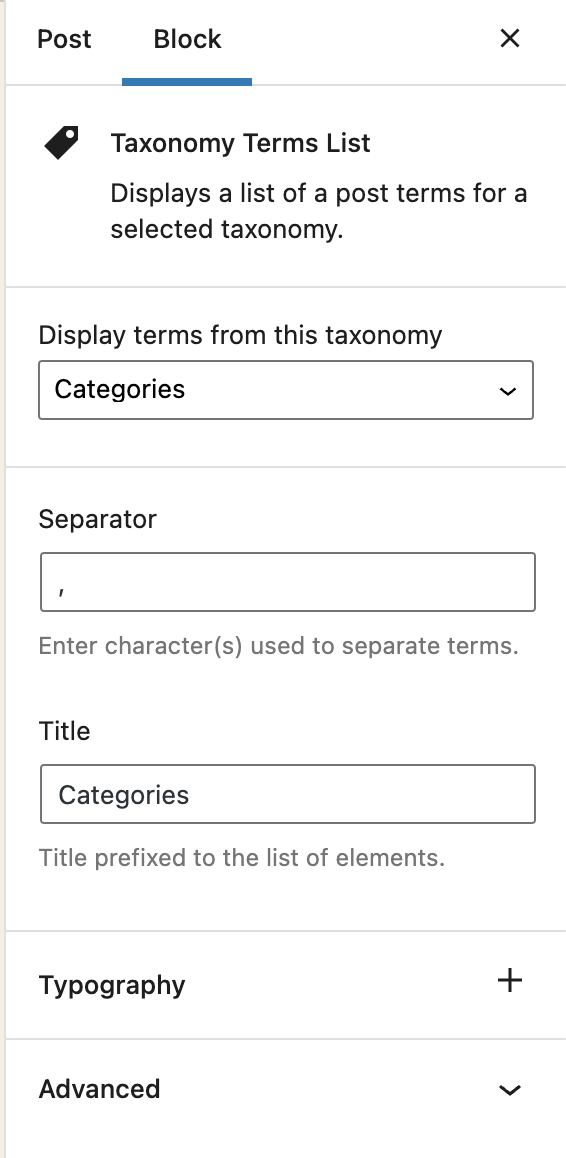
Block options 
Block content
Bloki
Šis spraudnis nodrošina 1 bloku.
- Taxonomy Terms List Displays a list of a post terms for a selected taxonomy.
Uzstādīšana
- Visit Plugins > Add New
- Search for ‘Taxonomy Terms List Block’
- Activate Taxonomy Terms List Block from your Plugins page.
- Open your block editor. Now you can add a new Taxonomy Terms List block.
Atsauksmes

Autori un izstrādātāji
“Taxonomy Terms List Block” ir atvērtā pirmkoda programmatūra. Šo spraudni ir veidojuši šādi cilvēki.
Līdzdalībnieki
“Taxonomy Terms List Block” ir tulkots lokalizācijā 1. Paldies tulkotājiem par ieguldījumu.
Tulkot “Taxonomy Terms List Block” savā valodā.
Vai jūs interesē attīstība?
Pārlūkojiet kodu, apmeklējiet SVN krātuvi vai abonējiet attīstības žurnālu, ko izveidojis RSS.
Izmaiņu žurnāls
1.1.2
Fix: The previous version did not properly include the translated strings. Props again to Christoph Herbst.
1.1.1
Fix: Some of the strings were not translatable. Props to Christoph Herbst.
1.1.0
Enhancement: Support custom background and text color.
Enhancement: Support custom spacing (margin/padding)
Some other UX improvements.
1.0.2
Fix: Taxonomy terms previsualization was not working in the block editor.
1.0.1
Allow to select any taxonomy if the current post has no taxonomies linked.
1.0
First release