

Apraksts
Note: This plugin only supports Genesis child themes. If you don’t know what that is, don’t download this plugin.
Genesis Bootstrap Carousel (GBC) allows you to create a simple responsive image carousel that displays the featured image, along with the title and excerpt from each post.
GBC is based off of the Genesis Responsive Slider and uses a lot of the same code. The main difference is that the Genesis Bootstrap Carousel uses the Carousel
jquery plugin created by the open source Twitter Bootstrap Project. The carousel.js in this plugin is roughly 1/4 the size of the jquery flexslider.js used by
the Genesis Responsive Slider. The CSS in this plugin is about half the size of the Genesis Responsive Slider plugin. Genesis Bootstrap Carousel also includes
options to easily disable the CSS and JS of the plugin, allowing you to move scripts or styles into a combined file inside your theme. GBC also uses CSS for the
next/previous arrows, avoiding an HTTP request and allowing easy customization via CSS. You may also choose what specifc post/page IDs the carousel JS and CSS get loaded on.
This way you can avoid loading assets on pages that are not using the Carousel and avoid unnecessarily increasing page load time.
It includes options for the maximum dimensions of your slideshow, allows you to choose to display posts, pages, custom post types, what category to pull from, and even the
specific post IDs of the posts you want to display. It includes next/previous arrows that can be turned on or off. Finally, you can place the carousel into a widget area.
The image carousel is also responsive and will automatically adjust for the screen it is being displayed on.
You can get information on how the carousel.js works by visiting the Carousel Section of the Twitter Bootstrap site.
Live example
Child Theme Integration
To adjust the carousel defaults for a child theme use a filter simiar to the following:
add_filter( 'bootstrap_carousel_settings_defaults', 'my_child_theme_bootstrap_carousel_defaults' );

function my_child_theme_bootstrap_carousel_defaults( $defaults ) {
    $defaults = array(
        'post_type'                      => 'post',
        'posts_term'                     => '',
        'exclude_terms'                  => '',
        'include_exclude'                => '',
        'post_id'                        => '',
        'posts_num'                      => 5,
        'posts_offset'                   => 0,
        'orderby'                        => 'date',
        'carousel_interval'              => 5000,
        'carousel_arrows'                => 1,
        'carousel_no_link'               => 0,
        'carousel_width'                 => '940',
        'carousel_height'                => '380',
        'carousel_excerpt_content'       => 'excerpts',
        'carousel_excerpt_content_limit' => 150,
        'carousel_more_text'             => 'Continue Reading',
        'carousel_excerpt_show'          => 1,
        'carousel_excerpt_width'         => 100,
        'location_vertical'              => 'bottom',
        'location_horizontal'            => 'left',
        'carousel_hide_mobile'           => 1,
        'html5_docytpe'                  => 0,
        'disable_css'                    => 0,
        'disable_js'                     => 0
    );
    return $defaults;
}
Ekrānuzņēmumi
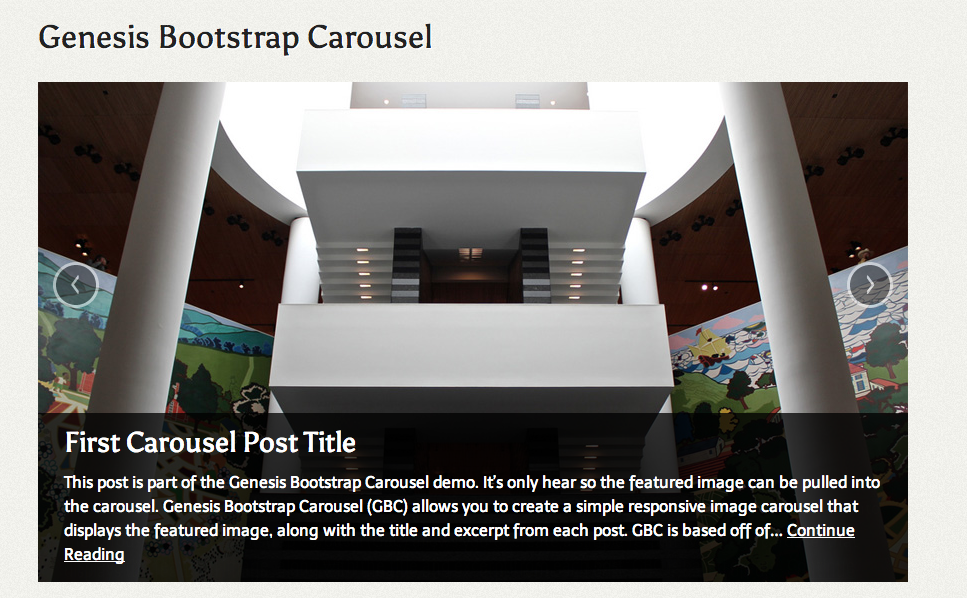
Carousel – Front End Display 
Carousel – Shrunk down at smaller screen size 
Carousel – Settings Page
Uzstādīšana
- Upload the entire
genesis-bootstrap-carouselfolder to the/wp-content/plugins/directory - DO NOT change the name of the
genesis-bootstrap-carouselfolder - Activate the plugin through the ‘Plugins’ menu in WordPress
- Navigate to the
Genesis > Carousel Settingsmenu - Configure the carousel
- In the “Widgets” screen, drag the “Genesis Bootstrap Carousel” widget to the widget area of your choice
Atsauksmes
Par šo spraudni nav atsauksmju.
Autori un izstrādātāji
“Genesis Bootstrap Carousel” ir atvērtā pirmkoda programmatūra. Šo spraudni ir veidojuši šādi cilvēki.
Līdzdalībnieki
Tulkot “Genesis Bootstrap Carousel” savā valodā.
Vai jūs interesē attīstība?
Pārlūkojiet kodu, apmeklējiet SVN krātuvi vai abonējiet attīstības žurnālu, ko izveidojis RSS.
Izmaiņu žurnāls
0.1.2
- Add a prefix to the html5_doctype function
0.1.1
- Add translation support
0.1.0
- Beta Release