
Apraksts
Mashlink Auditor, built by WPmash, is a lightweight internal linking plugin. It audits your internal links and helps you create new ones. It lists which posts, pages and custom post types link to each other, which anchor text each link uses, and which links are broken or redirected. New in 1.9.0: link opportunities, a smart suggestion panel in the block editor that finds places in your text to link to other pages on your site, and inserts the link with one click.
Find internal linking opportunities with a smart system
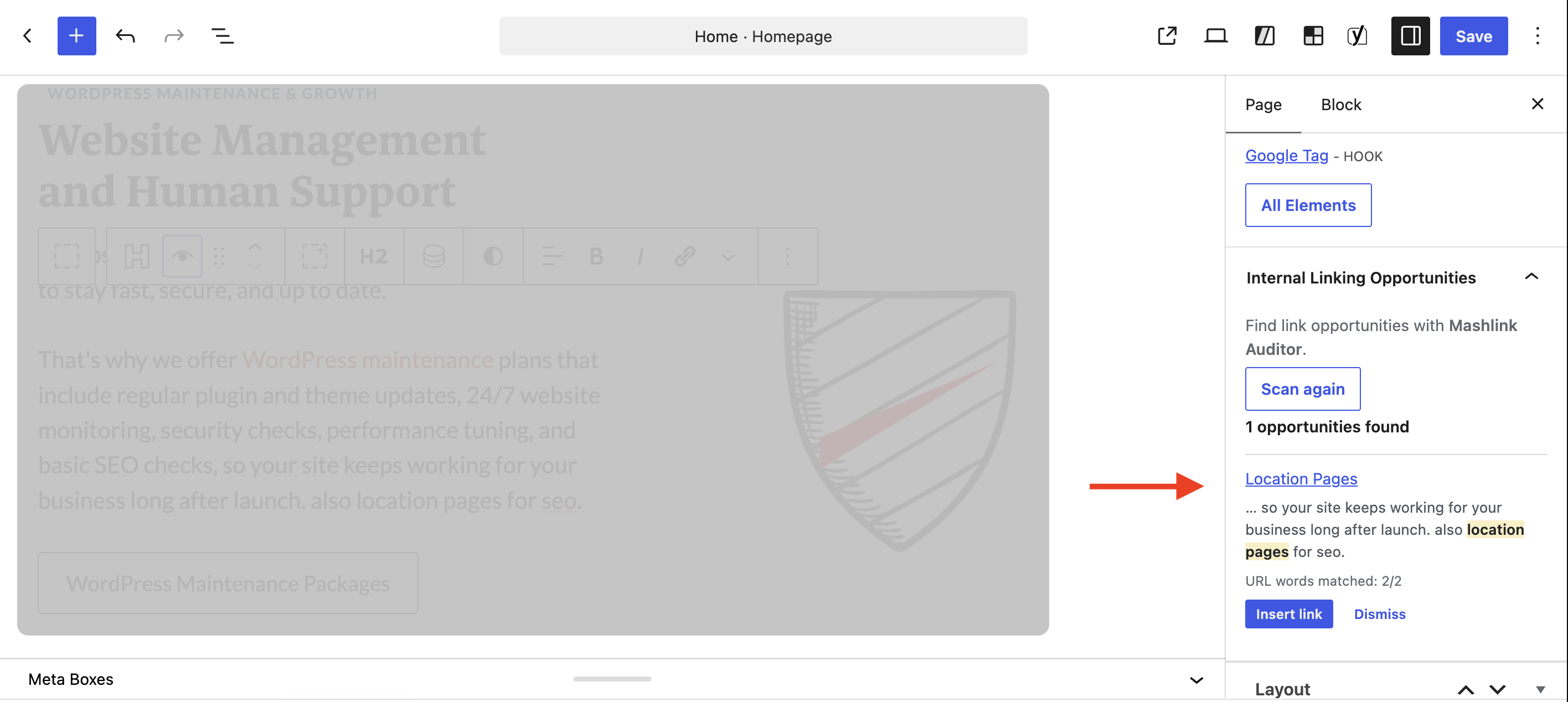
- Suggestions appear in the block editor sidebar, each one shown in context.
- Insert the link in one click. The editor scrolls to it.
- Pages you already link to are never suggested again.
- Works with ACF WYSIWYG fields and ACF blocks.
Link report
- Number of internal links in and out for every published post, page and custom post type.
- Colour tags for isolated content, content with no incoming links, dead ends (no outgoing links) and connected content.
- Sortable columns, search by title or URL, and a post type filter.
- Click an In or Out number to see which pages link and with which anchor text.
Anchor text tracking
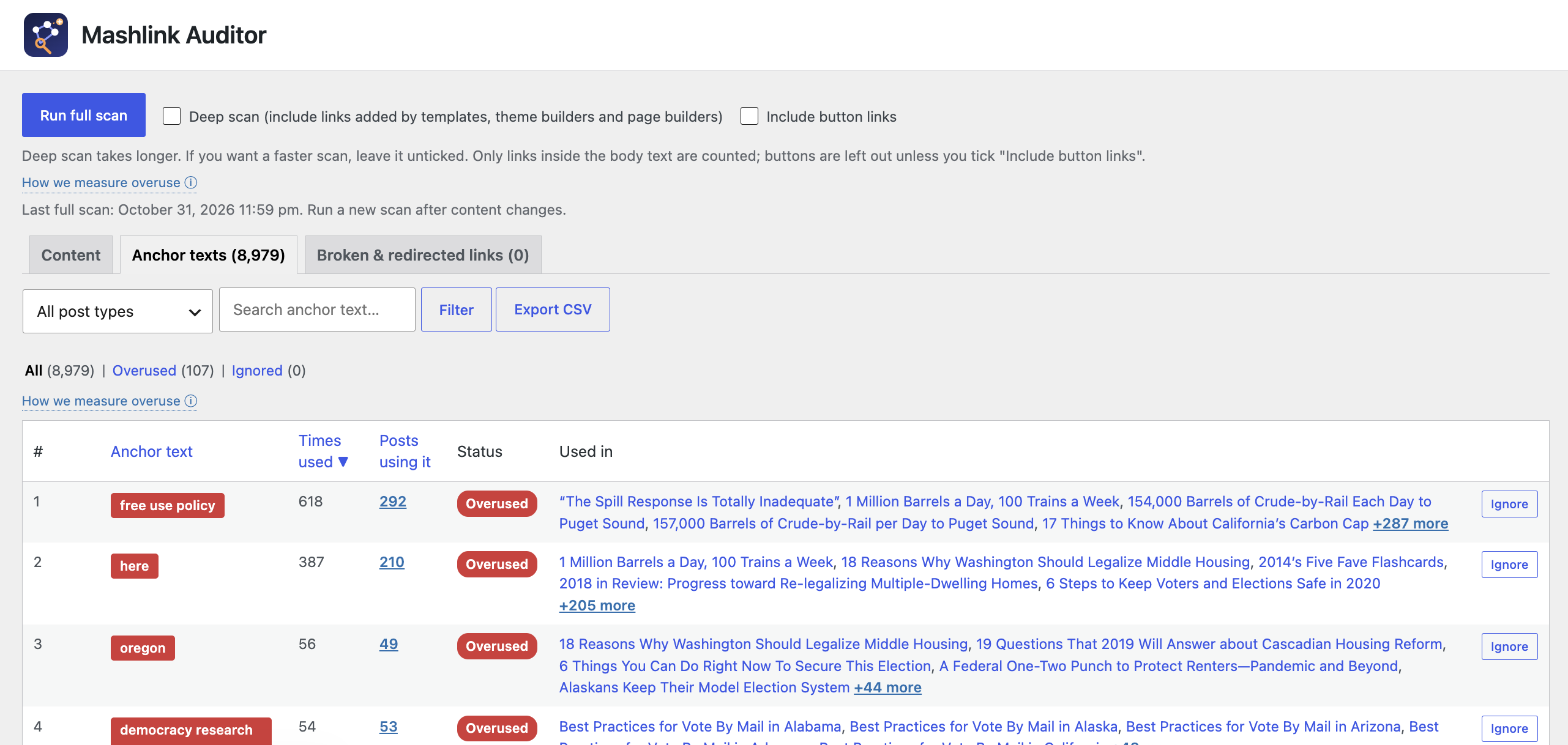
- Every anchor text with the number of times it is used and the pages that use it.
- An anchor is flagged in red as overused only when the same anchor links to one page more than 4 times AND makes up more than 15% of the links to that page. Anchors spread across many pages (like “read more”) are not flagged. Both numbers can be changed with the
wpmash_ila_anchor_limitandwpmash_ila_anchor_sharefilters. - An Ignore button for anchors that are fine to repeat.
Deep scan
- Reads the rendered page, so links added by templates, theme builders, page builders and query loops are counted.
- Reads synced patterns and HTML stored in custom fields such as ACF.
Broken and redirected links
- Requests each internal link from your site and reports errors, redirects, redirect chains and redirect loops.
- Shows the link as written, the URL it should point to, the anchor text and every page that contains it, with an Edit link.
Extras
- CSV export of any tab, with the current filters applied.
- A Diagnose box that shows what the scan sees on a single page.
- Pages are rescanned automatically when saved.
- No custom database tables and no front-end output.
Compatibility
The plugin has been tested with GeneratePress and GenerateBlocks only. It does not depend on a specific theme, but other themes and page builders have not been tested. Test on a staging copy and keep a backup before installing on a live site.
Privacy
The plugin sends no data to third parties and loads no external code. The deep scan and the link check request your own site’s URLs from your server, and only administrators can start them. When a link redirects to another website, the plugin reports the destination and does not request it.
Ekrānuzņēmumi


Uzstādīšana
- Upload the plugin folder to
/wp-content/plugins/, or install the zip from Plugins > Add New > Upload Plugin. - Activate the plugin.
- Open Tools > Mashlink Auditor (or click Settings on the Plugins screen) and click Run full scan.
- Open the Broken & redirected links tab and click Check links.
BUJ
-
Does it change my content?
-
Only when you ask it to. Scanning reads content only. The plugin changes a page only when you click Remove link in the report or Insert link in the editor panel. WordPress keeps a revision. It stores one post meta entry per post and a few options, and removes them when the plugin is deleted.
-
Can developers extend or unhook it?
-
Yes. The main class is not final and its methods are public or protected, so it can be extended. Every hook is registered with the shared instance, so it can be removed or re-prioritised, for example:
remove_action( 'save_post', array( WPMash_Link_Auditor::instance(), 'on_save' ), 20 );. Thewpmash_ila_loadedaction passes the instance once the plugin is ready. Filters:wpmash_ila_post_types,wpmash_ila_anchor_limit,wpmash_ila_anchor_share,wpmash_ila_scan_custom_fields,wpmash_ila_opp_limit. -
Why does a page show no links after a deep scan?
-
Some hosts and firewalls block a site from requesting its own pages. Use the Diagnose box at the bottom of the plugin page to see the HTTP response and the links found on that page.
Atsauksmes
Par šo spraudni nav atsauksmju.
Autori un izstrādātāji
“Mashlink Auditor” ir atvērtā pirmkoda programmatūra. Šo spraudni ir veidojuši šādi cilvēki.
Līdzdalībnieki
Tulkot “Mashlink Auditor” savā valodā.
Vai jūs interesē attīstība?
Pārlūkojiet kodu, apmeklējiet SVN krātuvi vai abonējiet attīstības žurnālu, ko izveidojis RSS.
Izmaiņu žurnāls
1.9.0
- New: Internal Linking Opportunities in the block editor. Find link opportunities with Mashlink Auditor and insert a link in one click. Works with ACF fields and ACF blocks.
- New: Remove link button in the report pop-ups.
- New: “Scan completed” pop-up and a “Scan first” notice.
- New: Stop scan and Stop check buttons while a scan or link check is running.
- Developers: the class can be extended and its hooks removed with
WPMash_Link_Auditor::instance(). - New header and icon, and lighter status blocks.
1.7.9
- Overused anchors are now judged per page: the same anchor must be used more than 4 times for one page and be over 15% of that page’s links. Big sites no longer get flags just for reaching 5 uses.
- Added a Settings link on the Plugins screen.
- Added a “View details” link on the Plugins screen that opens the WordPress.org plugin information pop-up.
- The admin page and menu are now called Mashlink Auditor.
- Image-only and empty links are no longer listed; only links with readable anchor text are audited.
- Only links inside the body text are counted. Previous/next post links, pagination, categories, tags, author and meta links, breadcrumbs, related-post lists, sidebars and other layout areas are ignored.
- Button links (theme buttons, WordPress and GenerateBlocks buttons, builder buttons) are left out by default. A new “Include button links” checkbox adds them.
- Added a “How we measure overuse” tooltip on the report.
- The Content tab now lists the most linked-to pages first, with a blue “Top Linked Page” badge on the single most linked page. Click the Status column to sort by status instead.
- The red overused-anchor box was removed from the Content tab; overused anchors are shown on the Anchor texts tab.
- Added a note that Deep scan is slower and can be skipped.
- Dynamic-tag placeholders in saved content (for example {{post_permalink}}) are no longer listed as links.
- Re-run the full scan after updating to rebuild the report.
1.7.7
- The link checker no longer requests other websites. A redirect that leaves the site is reported with its destination and is not followed.
1.7.6
- Author and company set to WPmash (wpmash.com).
1.7.5
- Renamed to Mashlink Auditor.
1.7.4
- Renamed.
1.7.3
- Renamed.
1.7.2
- Tested with WordPress 7.1.
- Renamed to Mashlink Auditor.
- Code standard fixes: translator comments, input sanitizing, removed set_time_limit and suppress_filters.
1.7.1
- Links stored in custom fields (ACF and similar) are now scanned.
1.7.0
- Added the Diagnose box.
1.6.0
- Added CSV export.
1.5.0
- Added the Broken & redirected links tab.
1.4.0
- Deep scan works with any theme or builder. Added search.