WordPress.org

Plugin Directory

Better Messages – čata istabas, grupu čats, privāti ziņojumi & AI čata boti

Better Messages – čata istabas, grupu čats, privāti ziņojumi & AI čata boti

Apraksts

Better Messages ir funkcijām bagātākā reāllaika privāto ziņu sistēma WordPress vietnēm ar vietējām integrācijām BuddyPress, BuddyBoss Platform, Ultimate Member, PeepSo un jebkuras citas WordPress vietnes.

Pārveidojiet savu WordPress vietni par jaudīgu komunikācijas platformu ar privātām ziņām, čata istabām, video un audio zvaniem, grupu video čatiem, AI čatbotiem un vietējām mobilajām lietotnēm.

Neatkarīgi no tā, vai veidojat privātu vai publisku kopienu, sociālo tīklu, iekštīklu, čata istabu vietni, tirgus vietu, dalības vietni, iepazīšanās platformu vai radītāju ekonomikas vietni – Better Messages nodrošina uzņēmuma līmeņa ziņojumapmaiņas funkcijas ar viegli lietojamu saskarni.

Izmēģiniet Better Messages:

Izstrādātājiem:

Populāri lietošanas gadījumi:

Better Messages tiek plaši izmantots, lai nodrošinātu ziņojumapmaiņu:

  • Privātas kopienas — maksas un tikai dalībniekiem paredzētas kopienas platformas, mastermind grupas, absolventu tīkli, kursu plūsmas, koučinga loki, ziņojumapmaiņa ar lomu ierobežojumiem, grupu čati, AI čata boti iesācējiem un BUJ, pilnīga šifrēšana sensitīvām sarunām
  • Publiskas kopienas un sociālie tīkli — atvērtas sociālās platformas, hobiju un interešu kopienas, vietnes, kas balstītas uz BuddyPress / BuddyBoss / PeepSo / FluentCommunity, privāta ziņojumapmaiņa, grupu sarunas, čata istabas, mini čata logrīki, kas seko lietotājiem visā vietnē
  • Iekštīkli un korporatīvās vietnes — iekšējā darbinieku saziņa, komandu un nodaļu kanāli, piekļuve ar lomu ierobežojumiem pēc WordPress lomām, failu kopīgošana, balss un video zvani attālinātām komandām, pašmitināts plāns vietnēm ar datu suverenitātes prasībām
  • Čata istabu vietnes — vietnes, kas veidotas ap reāllaika čata istabām kā galveno funkciju, publiskas un privātas istabas, tematiskas diskusijas, viesu piekļuve nereģistrētiem apmeklētājiem, piegāde caur AJAX vai WebSocket
  • Iepazīšanās un savedēju vietnes — privāts 1 pret 1 čats, foto un video pielikumi, balss un video zvani, čata pogas no profila uz profilu dalībnieku katalogos, viesu čats apmeklētājiem, kuri pārlūko vietni, pilnīga šifrēšana privātajām sarunām
  • Radītāju ekonomikas un fanu platformasmaksas ziņojumapmaiņa ar iekasēšanu par ziņu un zvanu, izmantojot GamiPress vai MyCRED, privāti video zvani, masveida ziņojumapmaiņa faniem, vienmēr aktīvi mini čata logrīki
  • Premium un monetizētas DM platformas — iekasēšana par tiešo ziņu vai zvanu ar cenu noteikšanu pēc lomām, atlikuma rādīšana, ziņojumapmaiņa ar lomu ierobežojumiem, AI satura moderācija, lai filtrētu surogātpastu un krāpšanas mēģinājumus
  • Koučinga un mentoringa platformas — DM starp klientu un koučeri, plānoti video zvani, balss ziņojumi, failu kopīgošana, kursu čata istabas caur LMS integrācijām
  • Tiešsaistes veikali (WooCommerce) — pirmspārdošanas čats produktu lapās, pēcpirkuma pasūtījumu atbalsts, ziņojumi, kuri ņem vērā groza kontekstu, iegultā iesūtne sadaļā Mans konts
  • Daudzu pārdevēju tirgus vietas un sludinājumi — pircēja un pārdevēja čats pie katra sludinājuma, atsevišķas virknes katram sludinājumam, viesu čats nereģistrētiem apmeklētājiem
  • Tiešsaistes kursi (LMS) — kursu čata istabas, DM starp pasniedzēju un studentu, grupu sarunas plūsmas kursiem
  • Forumi un Q&A kopienas — privātās ziņas saite pie katras atbildes, papildu čats virknes dalībniekiem
  • Nekustamā īpašuma un sludinājumu vietnes — pieprasījumu ziņojumi aģentiem, čata virknes nekustamā īpašuma kontekstā, viesu čats apmeklētājiem, kuri pārlūko vietni
  • Tiešraides pasākumi un vebināri — pasākuma vestibila čata istabas, viesu piekļuve nereģistrētiem dalībniekiem, grupu balss un video zvani AMA, piespraustas ziņas ar pasākuma darba kārtību
  • Rezervāciju un tikšanos platformas — viesa un saimnieka saziņa par sludinājumiem un rezervācijām, failu kopīgošana dokumentiem, balss un video zvani pirms ierašanās
  • Kripto un Web3 kopienas — čata istabas ar piekļuvi pēc žetoniem caur dalības spraudni un WordPress lomām, AMA grupu zvani, AI zināšanu boti whitepaper jautājumiem, mobilās lietotnes saziņai ceļā

Spraudnis “Better Messages” iepriekš tika saukts par “BP Better Messages“.

Tulkojiet Better Messages savā valodā

Ziņojumapmaiņas pamatfunkcijas:

  • AJAX vai WebSocket darbināmas sarunas reāllaikā
  • Privātas sarunas viens pret vienu
  • Grupu sarunas ar neierobežotu dalībnieku skaitu
  • Čata istabas ar viesu piekļuves atbalstu
  • Ziņas BuddyPress grupām, PeepSo grupām, Ultimate Member grupām, FluentCommunity grupām
  • Sarunu tēmas
  • Meklēt visās ziņās
  • Atzīmēt ziņas kā izlasi
  • Piespraust svarīgas ziņas sarunas augšā
  • Piespraust iecienītās sarunas saraksta augšā
  • Filtrēt sarunu sarakstu, lai rādītu tikai nelasītās sarunas
  • Atbildēt uz konkrētām ziņām
  • Rediģēt nosūtītās ziņas (ar rediģēšanas indikatoru)
  • Dzēst ziņas
  • Pārsūtīt ziņas uz citām sarunām
  • Sarunas paziņojumu apklusināšana
  • Ziņu melnrakstu automātiska saglabāšana ar atjaunošanu

AI & Automatizācija:

  • AI čatboti, kuru darbību nodrošina OpenAI, Anthropic (Claude) un Google Gemini
  • AI čatboti grupu sarunās ar atbildēm pēc pieminējumiem
  • Sarunu apkopošana un ieplānoti kopsavilkumi ar AI palīdzību
  • Žetonu lietojuma izsekošana ar izmaksu aprēķinu
  • Balss ziņojumu transkripcija ar Better Messages Cloud AI vai OpenAI
  • Tīmekļa meklēšanas iespēja AI botiem
  • Failu meklēšanas rīks AI botiem
  • Attēlu ģenerēšana ar AI
  • PDF failu atbalsts AI sarunām

Mediji & Saturs:

  • Failu koplietošana ar atsākamām augšupielādēm un iespēju aizsargāt failus no tiešas piekļuves (attēli, video, dokumenti)
  • Attēlu un video optimizācija klienta pusē starpplatformu pārlūkprogrammu saderībai un krātuves vietas ietaupīšanai (formātu konvertēšana, kvalitātes kontrole, metadatu noņemšana)
  • Balss ziņas (pieejamas kā papildinājums)
  • Iegultās saites ar sīktēliem un aprakstiem
  • oEmbed atbalsts YouTube, Vimeo, Spotify, SoundCloud, Flickr un 20+ pakalpojumiem
  • Emocijzīmju atlasītājs
  • Iebūvētas uzlīmju pakas ar piekļuvi pēc lomas un valodas atbalstu
  • GIF integrācija ar GIPHY un Klipy pakalpojumu sniedzējiem
  • Iebūvēti uzlīmju ieteikumi rakstīšanas laikā
  • Markdown teksta formatēšanas atbalsts

Paziņojumi:

  • E-pasta paziņojumi par nelasītām ziņām (pielāgojamas veidnes)
  • Atrakstīšanās saites atbalsts e-pastos
  • Skaņas paziņojumi par jaunām ziņām
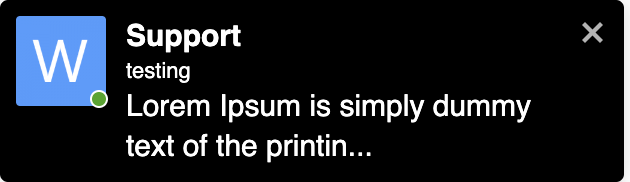
  • Uznirstošie paziņojumi jebkurā Jūsu vietnes vietā

Moderēšana & Drošība:

  • AI satura moderēšana ar diviem pakalpojumu sniedzējiem:
    • Better Messages Moderation AI — iekļauts WebSocket licencē bez papildu maksas, nav nepieciešamas trešo pušu API atslēgas. Darbību nodrošina Better Messages Cloud ar paplašinātām kategorijām, pielāgotiem noteikumiem un sarunas konteksta izpratni
    • OpenAI Moderation API — bezmaksas lietošanai, nepieciešama OpenAI API atslēga
  • Pielāgoti moderēšanas noteikumi — definējiet savus noteikumus vienkāršā tekstā
  • Sarunas konteksta izpratne — atklāj modeļus, kas sadalīti vairākās ziņās
  • Izvēlieties starp “Tikai atzīmēt” (ieteicams) vai “Aizturēt pārskatīšanai” moderēšanas darbībām
  • Iepriekš moderētas ziņas — ziņu pārskatīšana pirms piegādes
  • Ziņu ziņošanas funkcija
  • Necenzētu vārdu filtrs ar pielāgojamu melno sarakstu
  • Lietotāja bloķēšanas funkcija
  • Uz lomām balstīta piekļuves kontrole
  • Lietotāju baltais/melnais saraksts moderēšanai

Iesaistes funkcijas:

  • Reakcijas uz ziņām
  • Pieminējumi (@lietotājvārds)
  • Masveida ziņu sūtīšana no WP Admin ar plānošanu, failu pielikumiem un apstrādi fonā
  • Ieteiktās sarunas jauniem lietotājiem

Mini Widgets:

  • Iegult sarunu sākumpunktus jebkurā vietnes vietā, neizmantojot īskodus
  • Pieci logrīki: Draugi, Grupas, Lietotāji, AI boti, Čata istabas
  • Divi attēlošanas stili: klasiskā josla vai peldošais burbulis (ar čata galvām)
  • Trīs izvietošanas vietas: apakšējā josla, sānu panelis, mobilā ciļņu josla
  • Ikonu izvēlētājs katram logrīkam, meklēšanas lauks, lomu ierobežojumi un slēdzis “Slēpt cilni, kad tukša”
  • Lietotāju logrīks ar trim attēlošanas režīmiem (visi / pēc lomas / izlasīti manuāli) un kārtošanu pēc pēdējās aktivitātes vai reģistrācijas datuma
  • Pielāgojama ciļņu secība mini logrīkos, sānu panelī un mobilajā skatā

Pielāgošana:

  • Moderns, pilnībā pielāgojams dizains
  • Vienkārša krāsu pielāgošana caur WP pielāgotāju
  • Pielāgoti paziņojumu skaņas signāli
  • RTL izkārtojuma atbalsts
  • Baltā etiķetes risinājums
  • Pilnībā tulkojams
  • Veco ziņu automātiskas dzēšanas opcija

Privātums & VDAR:

  • Īpaša Privātuma & VDAR iestatījumu lapa
  • Visi ziņu dati tiek glabāti Jūsu serverī
  • AI moderācija (ja iespējota) nosūta ziņas saturu analīzei — Better Messages Cloud neglabā nekādus datus, izmantojot OpenAI pakalpojumu sniedzēju, izskatiet OpenAI datu politiku
  • WordPress personas datu eksporta un dzēšanas atbalsts (Rīki Eksportēt/Dzēst personas datus)
  • Ieteiktais privātuma politikas teksts, kas pielāgojas atkarībā no iespējotajām funkcijām
  • Pašmitinātu emocijzīmju attēlu opcija — bez ārējiem CDN pieprasījumiem
  • Privātumam draudzīgi video iegulumi — YouTube, Vimeo ielādējas tikai pēc lietotāja klikšķa
  • Netiek iestatīti sīkfaili, nav analītikas vai izsekošanas skriptu
  • Privātuma & VDAR dokumentācija

Šis nav pilns funkciju saraksts — Better Messages piedāvā vēl daudzas citas mazākas funkcijas un opcijas, kas šeit nav uzskaitītas. Mēs pastāvīgi pievienojam jaunas funkcijas un uzlabojumus, pamatojoties uz lietotāju atsauksmēm.

Saderīgi spraudņi & tēmas — vairāk nekā 35 vietējās integrācijas:

Better Messages darbojas jebkurā WordPress vietnē uzreiz pēc instalēšanas. Ja jūsu vietnē jau darbojas kopienas spraudnis, LMS, tirgus vieta vai katalogs, Better Messages tieši savienojas ar to — mantojot dalībniekus, profilus, grupas, kursus, sludinājumus un ierakstus, lai čata elementi parādītos pareizajās vietās bez papildu konfigurācijas.

Kopienu & dalības platformas — aizstāj iebūvēto ziņojumapmaiņu un manto dalībniekus, profilus, draugus un grupas:

Mācību pārvaldības sistēmas (LMS) — kursu čata istabas, pasniedzēju ziņojumi un studentu savstarpējās sarunas:

E-komercija — WooCommerce — pirmspārdošanas un pasūtījumu atbalsta čats tiešsaistes veikaliem:

  • WooCommerce — saziņas pogas produkta, groza, kases un pasūtījuma lapās. Groza saturs automātiski tiek nosūtīts sarunā kā bagātīga ziņa, lai jūsu atbalsta aģents uzreiz redzētu, ko klients aplūko, pasūtījuma lapas nosūta strukturētu pasūtījuma konteksta kartīti. Vienkārši produktu URL, ielīmēti čatā, tiek paplašināti par bagātīgām produkta kartītēm. Iegultā iesūtne atrodas tieši WooCommerce Manā kontā. Saderīgs ar HPOS, saderīgs ar bloku tēmām, darbojas ar viesu kasi. Pieejams gan bezmaksas, gan WebSocket versijās — WebSocket versija atver čatus kā uznirstoša mini logrīka pārklājumu, nevis pāriet uz citu lapu.

Tirgus vietas & daudzu pārdevēju — pircēja un pārdevēja čats virs WooCommerce ar katra pārdevēja izvēles iespējām un saziņas pogām pārdevēju veikalos, produktu lapās un pasūtījumu detaļās:

Sludinājumi, katalogi & klasificētie — saziņas pogas pie katra sludinājuma ar atsevišķām virknēm katram sludinājumam:

Nekustamā īpašuma tēmas — aģentu un pieprasījumu ziņojumi nekustamā īpašuma sludinājumos:

Forumi — privātās ziņas saite pie katras atbildes:

Spēļošana, punkti & maksas piekļuve — iekasēšana par ziņu vai zvanu ar cenu noteikšanu pēc lomām un atlikuma rādīšanu:

Automatizācija & lapu veidotāji:

Push & PWA:

Universāls Shortcode Builder — pievienojiet čatu jebkam citam:

Neredzat savu spraudni vai tēmu sarakstā? Better Messages piedāvā vizuālo Shortcode Builder izvēlnē WP Admin Better Messages Shortcodes, kas ļauj ievietot Live Chat pogu jebkurā pielāgotā ieraksta veidā, katalogā, tirgus vietas sludinājumā, aģenta profilā vai lapu veidotāja blokā — bez PHP rakstīšanas. Norādiet to uz parauga ierakstu, izvēlieties, kā tiek noteikts mērķa lietotājs (ieraksta autors, postmeta saglabāts lietotāja ID vai fiksēta iesūtne), iestatiet virknes stratēģiju un etiķeti un kopējiet ģenerēto īso kodu. Tas pats īsais kods darbojas katram ieraksta veida ierakstam ar automātisku virknēšanu katram ierakstam un papildu reklāmkarogu čatā. Ielīmējiet to Gutenberg, Elementor, Bricks, Divi vai tieši tēmas veidnē.

Pilns integrāciju saraksts

Droši ziņojiet par jebkādu nesaderību vai pieprasiet vairāk integrāciju — tas ir ļoti svarīgi un palīdz uzlabot Better Messages!

WebSocket versija:

WebSocket versija ir maksas opcija, licences atslēgu Jūs varat iegūt mūsu vietnē.

WebSocket sakaru īstenošanai starp jūsu vietni un lietotājiem mēs izmantojam savus dedicētos serverus. Mūsu serveri ir pilnīgi privāti un neglabā un neseko nekādiem privātiem datiem — visas ziņas paliek jūsu datu bāzē.

Veiktspēja & Uzticamība:

  • Ievērojami samazina servera slodzi (līdz 200 reižu mazāk pieprasījumu)
  • Tūlītēja ziņu piegāde reāllaikā
  • Darbojas ar jebkuru hostingu, ieskaitot koplietošanas hostingu
  • Nav ierobežojumu vienlaicīgu savienojumu vai mēneša aktīvo lietotāju skaitam

Video & audio zvani:

  • HD video zvani (1 pret 1)
  • HD audio zvani (1 pret 1)
  • Grupu video čati (līdz 32 dalībniekiem)
  • Grupu audio čati (līdz 50 dalībniekiem)
  • Ekrāna koplietošana zvanos un grupu čatos

Mobilās lietotnes (Alfa):

  • iOS mobilā lietotne (izveidojiet savu zīmola lietotni) — Alfa
  • Android mobilā lietotne (izveidojiet savu zīmola lietotni) — Alfa
  • Push paziņojumi par zvaniem un ziņām
  • VoIP paziņojumi par ienākošajiem zvaniem

Piezīme: Mobilās lietotnes pašlaik ir alfa stadijā. Pamata funkcionalitāte darbojas, taču dažas funkcijas var būt ierobežotas vai izstrādes stadijā.

Reāllaika funkcijas:

  • Ziņu piegādes statuss (nosūtīts, piegādāts, izlasīts)
  • Aktivitātes indikatori: rakstīšana, balss ierakstīšana un failu augšupielāde
  • Tiešsaistes/Bezsaistes klātbūtnes indikators
  • Lietotāju statusi (Tiešsaistē, Projām, Netraucēt)
  • Mini čati — čata logi jebkurā Jūsu vietnes vietā
  • Mini sarunu logrīks — uzskaitiet un turpiniet nesenās sarunas no jebkuras lapas
  • Filtrs “Tikai tiešsaistē” un kārtošana ar tiešsaistes lietotājiem priekšplānā lietotāju mini logrīkam

Better Messages Cloud AI:

  • Automātiska ziņojumu tulkošana divvirzienu sarunās — 53 valodas, automātiska noteikšana
  • AI Content Moderation — 23 kategorijas, pielāgoti noteikumi, sarunas konteksta apzināšanās
  • Balss ziņojumu transkripcija — 99+ valodas ar automātisku noteikšanu
  • Nav nepieciešamas trešo pušu API atslēgas — iekļauts WebSocket licencē bez papildu maksas

Drošība & Šifrēšana:

  • Pēc izvēles pilnīgā šifrēšana (E2EE) — var iespējot vietnes līmenī un katrai sarunai, ziņas un faili tiek šifrēti lietotāju pārlūkprogrammās ar AES-256-GCM, serveris nekad neredz atklātu tekstu
  • Lokāla pārlūkprogrammas šifrēšana (AES256) ziņu glabāšanai bezsaistē
  • Tīmekļa push paziņojumi (darbojas pat tad, kad pārlūkprogramma ir aizvērta)
  • Visi dati šifrēti pārsūtīšanas laikā, tāpēc mēs tos nevaram nolasīt savos serveros

Atbalsts:

  • Prioritārs e-pasta atbalsts
  • Regulāri atjauninājumi un jaunas funkcijas

Kāpēc WebSockets maina spēles noteikumus?

Iegūstiet WebSocket versijas licences atslēgu | Lietošanas noteikumi

Valodas

RTL izkārtojums ir iebūvēts spraudnī.

Jūs varat tulkot spraudni savā valodā ar LocoTranslate vai piedalīties spraudņa tulkošanā.

Ekrānuzņēmumi

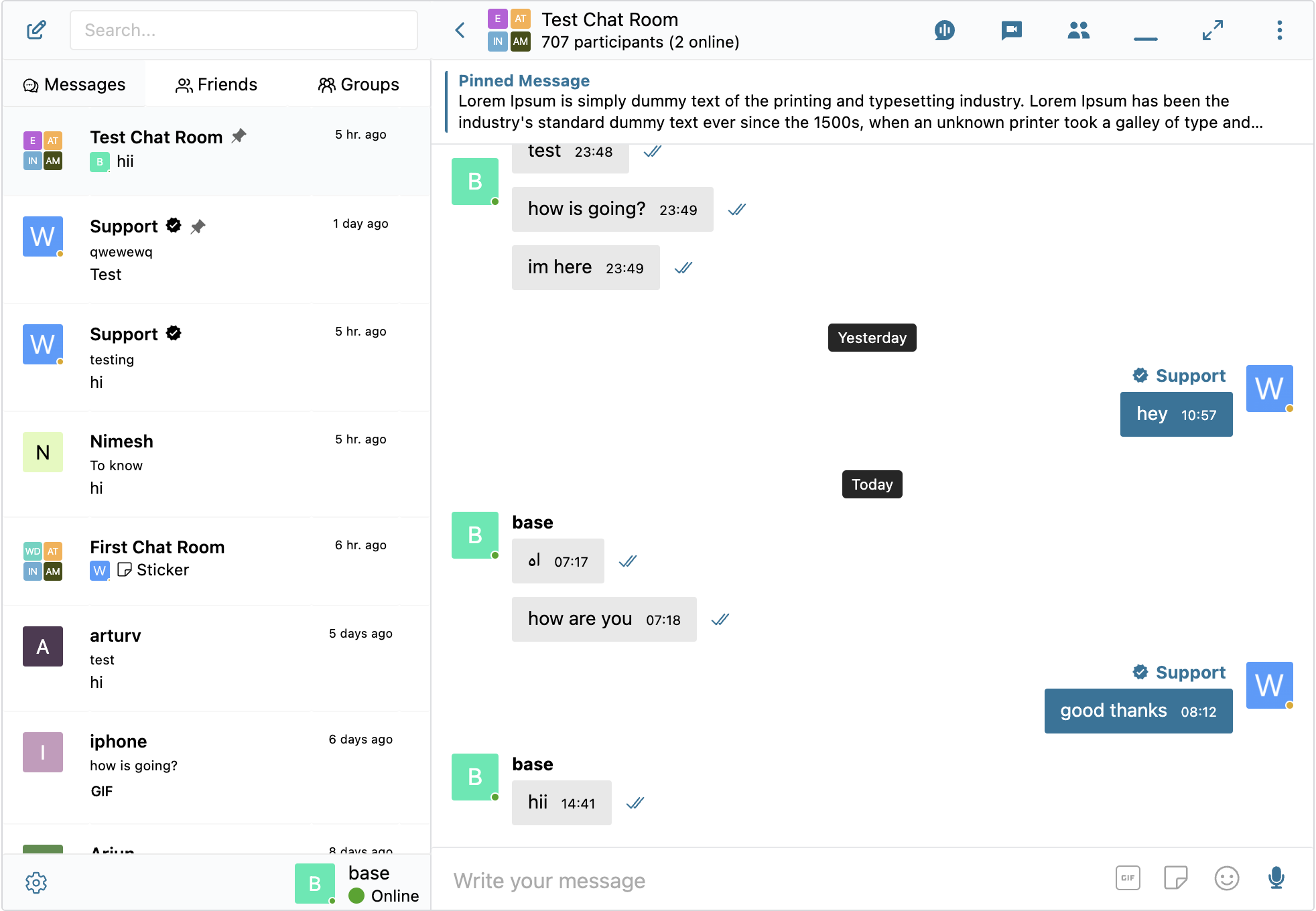
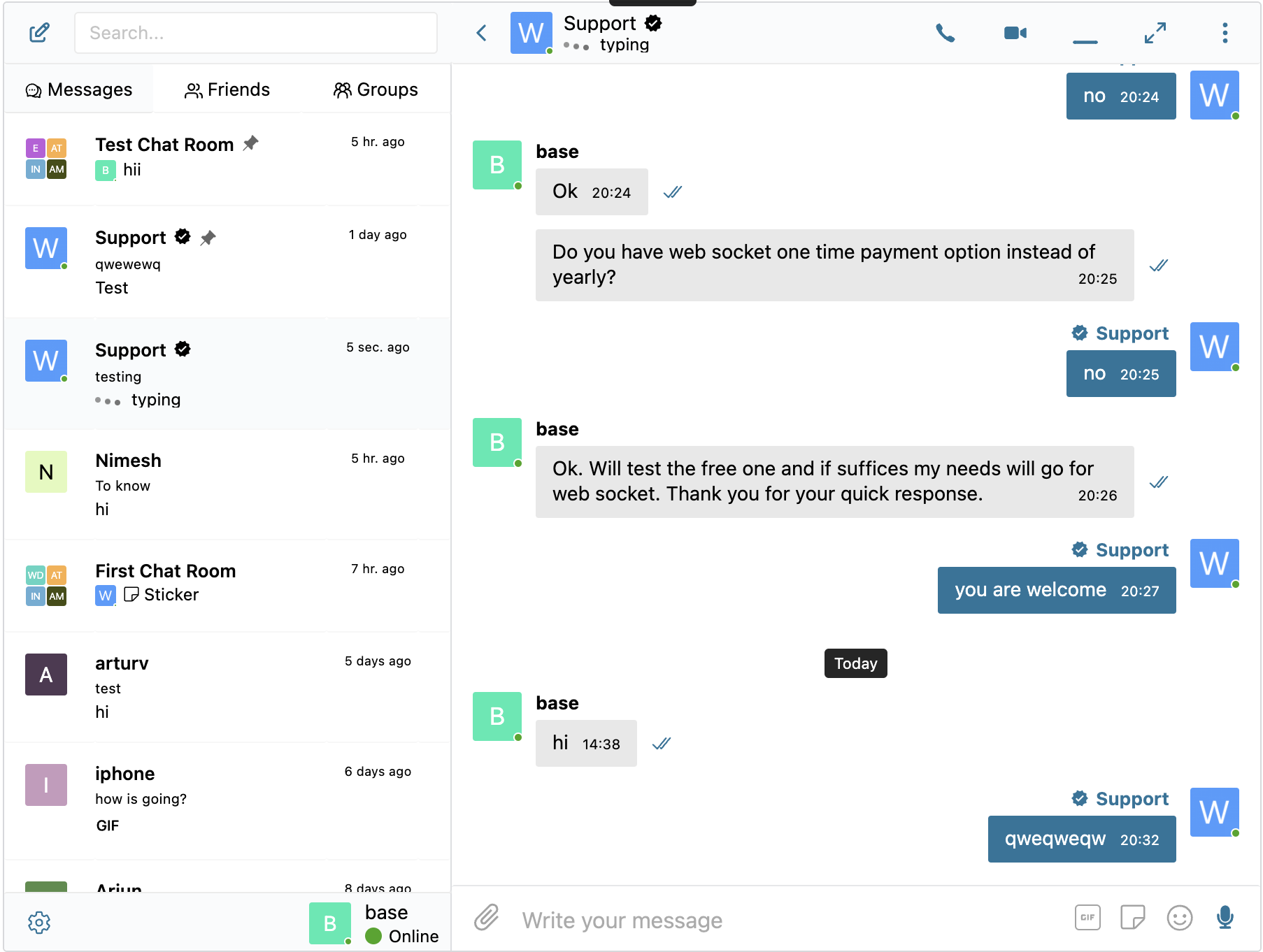
  • Reāllaika privāta ziņu sarakstei ar grupu sarunu, failu kopīgošanu, reakcijām un emoji
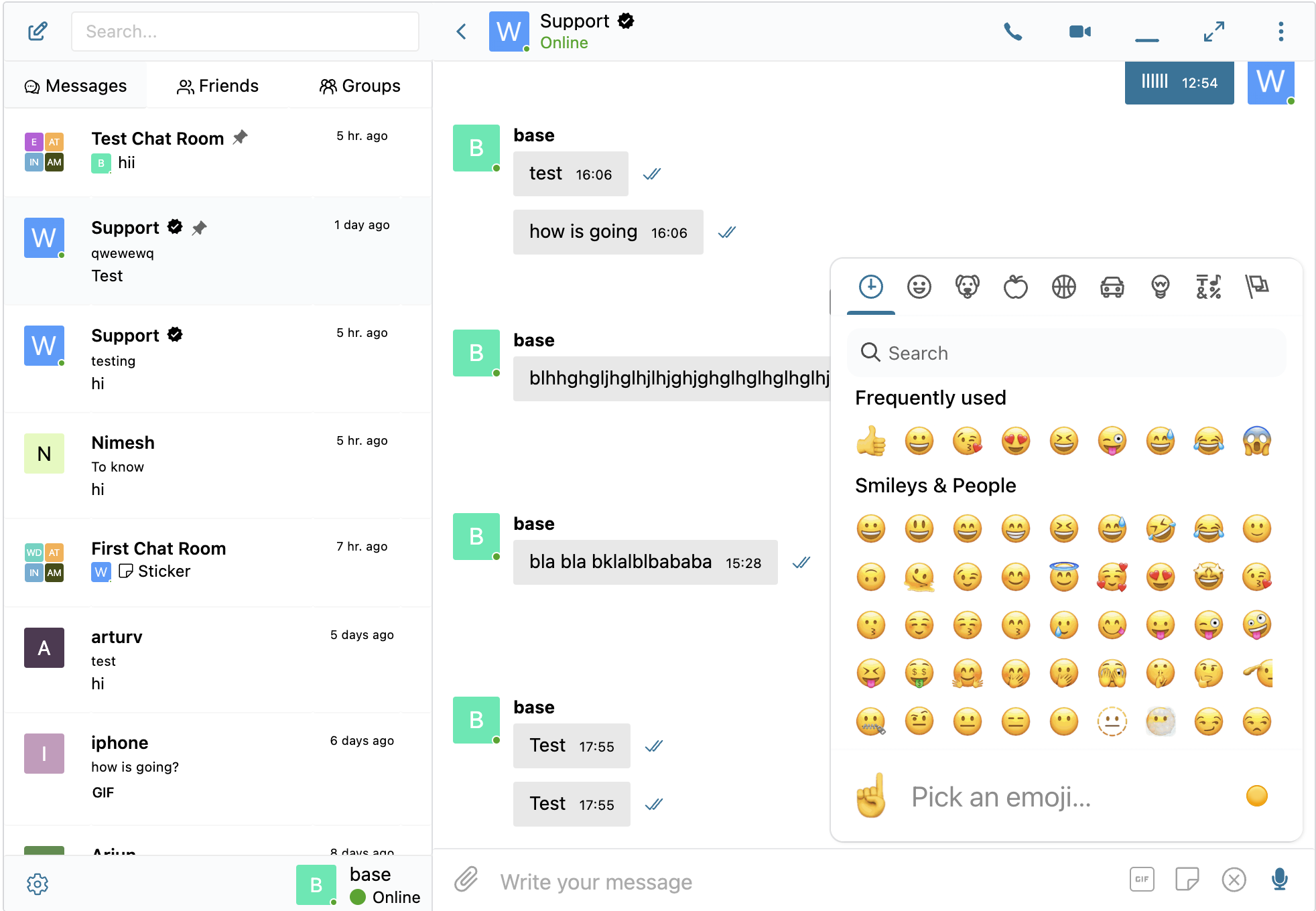
  • Iegulti video un saišu priekšskatījumi — YouTube, Vimeo, Spotify un vairāk nekā 20 oEmbed nodrošinātāji
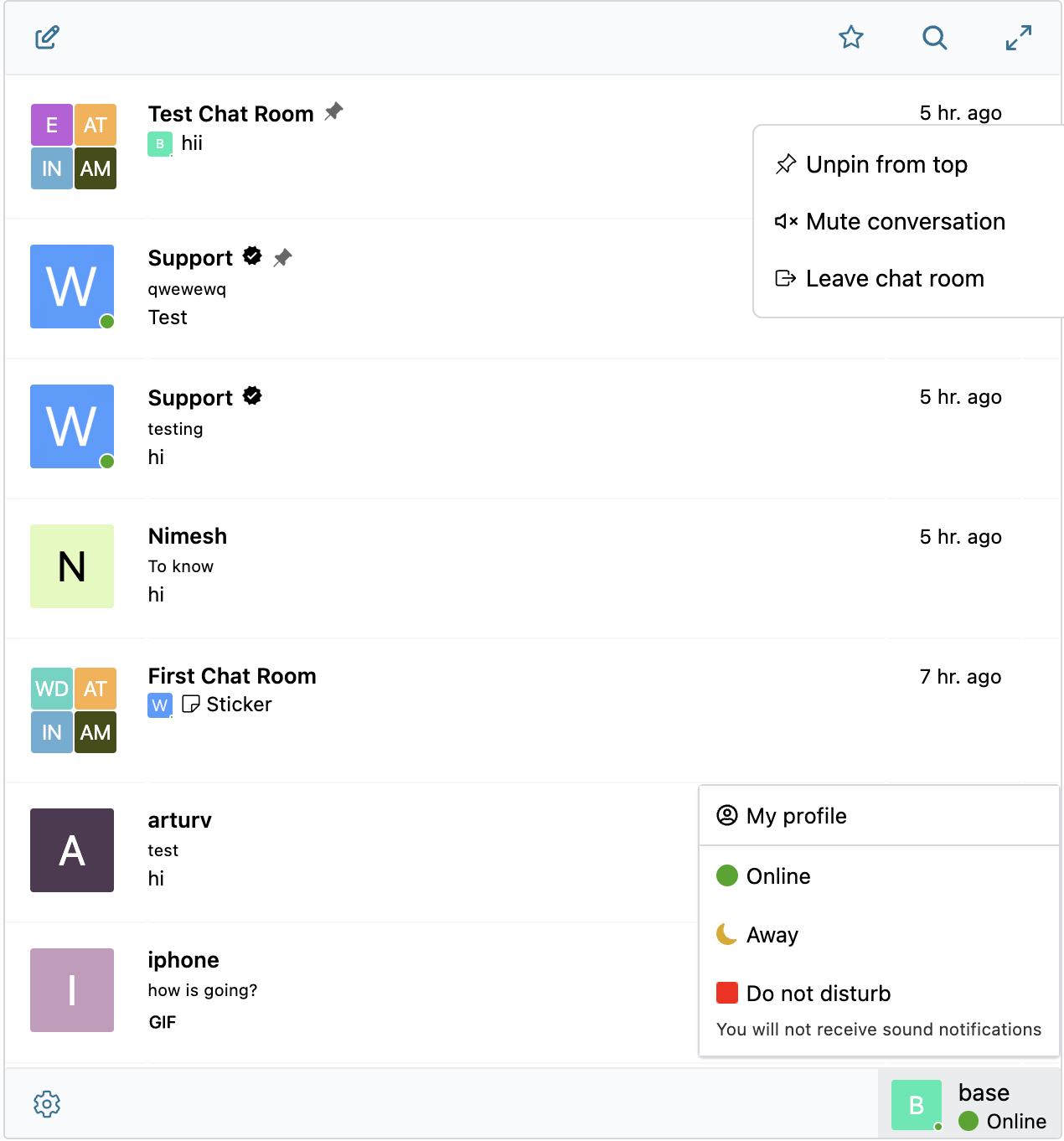
  • Sarakstes iesūtne ar nelasītu ziņu nozīmītēm, piespraustām sarakstēm un pilna teksta meklēšanu ziņās
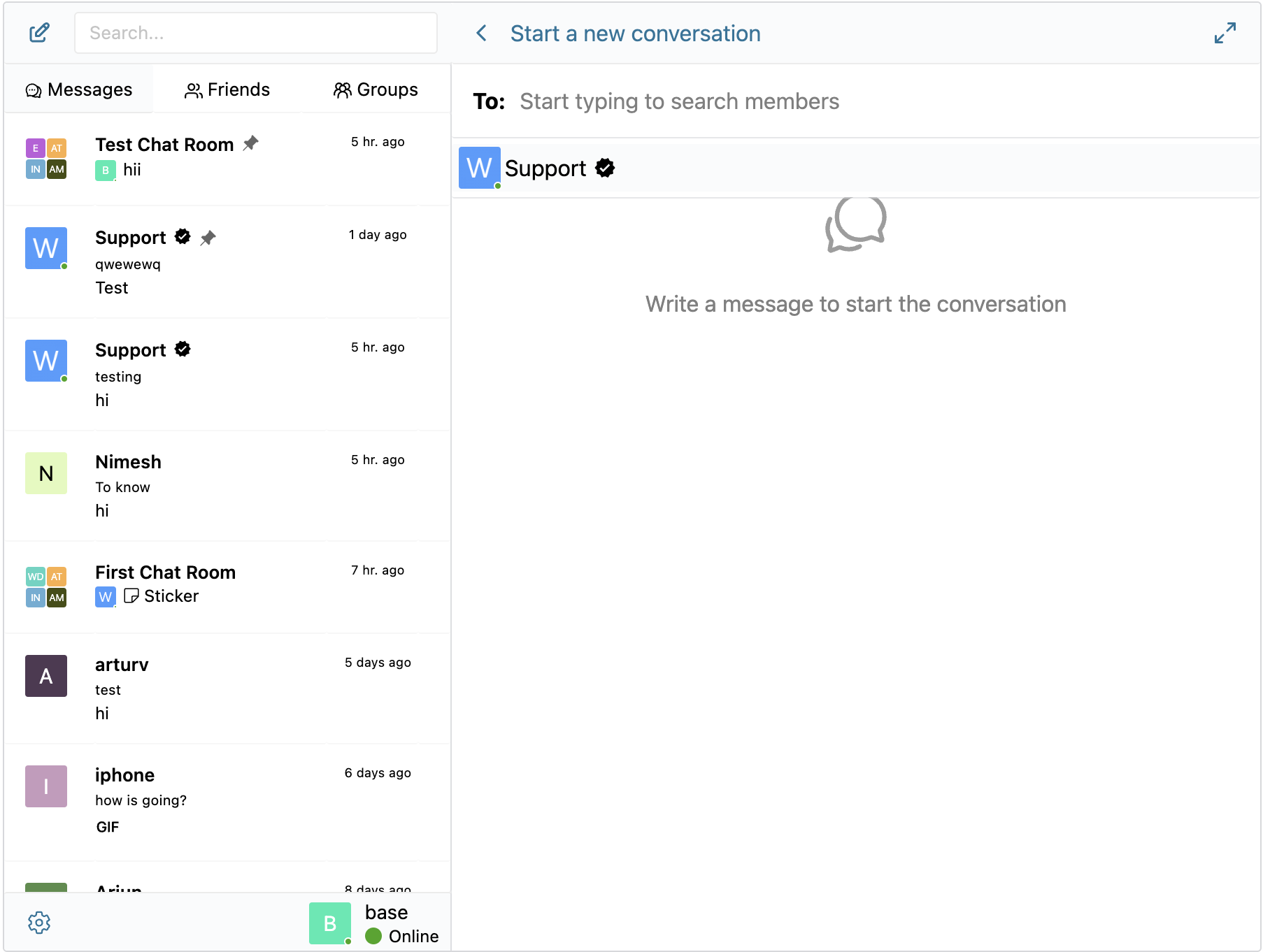
  • Sāciet jaunu sarakstei ar saņēmēju meklēšanu un draugu sarakstu
  • Reāllaika rakstīšanas indikators un tiešsaistes statuss (WebSocket versija)
  • Vietnē redzami toast paziņojumi par jaunām ziņām — redzami jebkurā vietā jūsu WordPress vietnē

Bloki

Šis spraudnis nodrošina 2 blokus.

  • User Inbox Personal user inbox, where user can access all conversations which he is participating in
  • Chat Room Embed a Better Messages chat room

Uzstādīšana

  1. Augšupielādējiet spraudņa failus mapē /wp-content/plugins/bp-better-messages vai instalējiet spraudni tieši caur WordPress spraudņu sadaļu.
  2. Aktivizējiet spraudni caur WordPress sadaļu ‘Spraudņi’
  3. Izmantojiet Iestatījumi -> Better Messages, lai konfigurētu spraudni

BUJ

Vai Better Messages ir bezmaksas?

Jā — instalējiet bezmaksas versiju no WordPress.org. Tā atbalsta privātas un grupu sarakstes, čatu telpas, failu kopīgošanu, oEmbed priekšskatījumus, gudri grupētus e-pasta paziņojumus, lomās balstītu piekļuvi, guest chat un standarta messenger funkciju kopumu. WebSocket versija ir maksas, un tā atver tūlītēju piegādi, balss / video zvanus viens pret vienu un grupās, AI Chat Bots, AI Content Moderation, AI Message Translation, Voice Message Transcription, tīmekļa push paziņojumus un end-to-end šifrēšanu.

Ar kuriem WordPress spraudņiem Better Messages integrējas?

Vairāk nekā 35 vietējās integrācijas dažādās kopienu platformās (BuddyPress, BuddyBoss Platform, PeepSo, Ultimate Member, FluentCommunity, SureDash, ProfileGrid, UsersWP, WP User Manager), LMS (LearnDash, LearnPress, Tutor LMS, MasterStudy LMS), e-komercijā (WooCommerce — pirmspārdošanas un pasūtījumu atbalsta čats ar saziņas pogām produkta, groza, kases un pasūtījuma lapās), daudzu pārdevēju tirgus vietās (Dokan, WCFM, WC Vendors, MultiVendorX), sludinājumos un katalogos (HivePress, Directorist, GeoDirectory, Classified Listing, Motors, WP Job Manager), nekustamā īpašuma tēmās (Houzez, RealHomes), forumos (wpForo, bbPress), spēļošanā (GamiPress, MyCRED), automatizācijā (Uncanny Automator, AutomatorWP), lapu veidotājos (Crocoblock JetEngine) un push / PWA (OneSignal, Progressify). Ja jūsu spraudnis nav sarakstā, iebūvētais vizuālais Shortcode Builder ļauj pievienot pogu Live Chat jebkuram pielāgotam ieraksta veidam bez PHP rakstīšanas. Skatiet pilnu integrāciju sarakstu.

Vai tā atbalsta grupu sarakstes?

Jā — pilnvērtīgas grupu sarakstes ar koplietotu vēsturi, pieminējumiem, reakcijām, failu augšupielādēm, atbildēm, rediģēšanu / dzēšanu / pārsūtīšanu un grupu balss / video zvaniem (WebSocket versija). Grupu sarakstes var automātiski sasaistīt ar BuddyPress / BuddyBoss / PeepSo / Ultimate Member / FluentCommunity grupām — dalībnieki pievienojas sarakstei un to atstāj sinhroni ar avota kopienas grupu.

Vai nereģistrēti apmeklētāji (viesi) var sarakstīties?

Jā — Guest Chat ļauj nereģistrētiem apmeklētājiem pievienoties čatu telpām, sūtīt ziņas pārdevējiem tirgus platformās, uzdot jautājumus kataloga ierakstos vai sazināties ar vietnes atbalstu. Viesis ievada attēloto vārdu (un pēc izvēles e-pasta adresi), un tad piedalās kā lietotājs-viesis. Viņa sarakstes vēsture tiek saglabāta, ja viņš vēlāk reģistrējas.

Vai tā atbalsta balss un video zvanus WordPress vidē?

Jā (WebSocket versija) — divpusēji un grupu balss / video zvani notiek tieši ziņojumapmaiņas virknē, nevis kā atsevišķa Zoom / Whereby integrācija. Mitināts mediju retranslators ir iekļauts WebSocket licencē, nav vajadzīgs atsevišķs Twilio konts, Daily / Whereby abonements vai Zoom izstrādātāja plāns. Zvani mobilajā ierīcē ir pilnekrāna režīmā, bet datorā – attēls attēlā.

Vai Better Messages ir saderīga ar GDPR?

Jā. Visi ziņu dati tiek glabāti tikai jūsu WordPress datu bāzē. WebSocket mākoņa relejs ir „akls” pret ziņu saturu — tas maršrutē šifrētus notikumus, taču nelasa, neuzglabā un nepārbauda to, kas tam iet cauri. Better Messages integrējas arī ar WordPress iebūvētajiem personas datu eksportēšanas un dzēšanas rīkiem. Vietnēm ar stingrākām datu suverenitātes prasībām (GDPR 9. pants, HIPAA tuvi gadījumi, regulētas datu darba slodzes) ir pieejams self-hosted plāns — sazinieties ar atbalstu.

Vai ir AI funkcijas?

Jā (WebSocket versija, AI papildinājums). AI čata boti (OpenAI, Anthropic Claude, Google Gemini) darbojas kā pilntiesīgi dalībnieki jebkurā virknē, ar pielāgotām sistēmas pamudinājumiem un punktu iekasēšanu par katru botu, izmantojot GamiPress / MyCRED. Better Messages Cloud AI nodrošina AI satura moderāciju (vairāk nekā 23 kategorijas, ieskaitot surogātpastu, krāpšanu, doxing, kontaktinformācijas dalīšanos), AI ziņu tulkošanu (53 valodas ar automātisku atpazīšanu) un balss ziņu transkripciju (vairāk nekā 99 valodas) — viss iekļauts WebSocket licencē, nav nepieciešama trešās puses API atslēga.

Vai ir vietējās iOS un Android lietotnes?

Jā — Better Messages piedāvā uz Capacitor balstītas vietējās iOS un Android mobilās lietotnes ar push paziņojumiem, piegādi reāllaikā, balss / video zvaniem un pilnvērtīgu funkcionalitātes paritāti ar messenger tīmekļa versiju. Vietnēm, kuras vēlas savu zīmola lietotni App Store / Play Store ar savu izstrādātāju kontu, ir pieejama white-label pārbūve.

Vai varu pārtulkot messenger saskarni savā valodā?

Jā — Better Messages ir pilnībā tulkojama, izmantojot WordPress standarta tulkošanas rīkus (Loco Translate, WPML, Polylang) ar text domain bp-better-messages. Tiek piegādāta ar vairāk nekā 30 kopienas tulkojumiem. Tulkojumu var pievienot vai uzlabot vietnē translate.wordpress.org.

Vai tas atbalsta end-to-end šifrēšanu?

Jā (WebSocket versija). Pilnīgā šifrēšana tiek iespējota katrai virknei — ziņas un failu pielikumi sūtītāja pārlūkprogrammā tiek šifrēti ar AES-256-GCM pirms pārsūtīšanas, paliek šifrēti datu bāzē miera stāvoklī un tiek atšifrēti tikai saņēmēja pārlūkprogrammā. Serveris glabā tikai šifrētu tekstu, neviens administrators, mitināšanas inženieris vai uzbrucējs ar piekļuvi datu bāzei nevar nolasīt E2E virknes ziņu saturu.

Kur atrodama detalizēta dokumentācija?

Pilnā dokumentācija, integrāciju ceļveži, REST API atsauce, hooks atsauce, video pamācības un vairāk nekā 80 emuāra ierakstu atrodami vietnē www.better-messages.com.

Atsauksmes

29 maijs, 2026
Looks great, functions better than expected, and excellent support. If only all Wordpress plugins were this well made and maintained.
15 maijs, 2026
Better Messages has been a very useful plugin for our WooCommerce/Dokan marketplace. We use it for buyer-to-seller communication, and the WebSocket version makes the experience feel smooth and real-time.It is a practical and affordable alternative to external chat platforms, while still offering the main features we need: private conversations, notifications, and an internal inbox.One improvement that would help us a lot would be easier control over frontend notification prompts and translation strings, especially for browser push notifications.Overall, it is a strong plugin and a great choice for marketplaces that need internal messaging without building a custom chat system from scratch.
13 decembris, 2025
Perfectly suited to my needs, the free version is already very feature-rich. Well done.
7 augusts, 2025
I had the an issue with a small BUG in the plugin today. He responded within 3 minutes of sending the request and launched an update to wordpress within the hour. The issue was fixed faster than I could imagine. Thanks! Awesome work guys.
Thank you for such a great plugin. It is very obvious that there was a lot of thought and hard work put into the development of the Better Messages plugin. Please continue to upgrade and add any features that would make it an even greater plugin. If you are interested, please contact me by email, I have a few suggestions that I would like to share with you.
Lasīt 137 atsauksmes

Autori un izstrādātāji

“Better Messages – čata istabas, grupu čats, privāti ziņojumi & AI čata boti” ir atvērtā pirmkoda programmatūra. Šo spraudni ir veidojuši šādi cilvēki.

Līdzdalībnieki

“Better Messages – čata istabas, grupu čats, privāti ziņojumi & AI čata boti” ir tulkots lokalizācijā 31. Paldies tulkotājiem par ieguldījumu.

Tulkot “Better Messages – čata istabas, grupu čats, privāti ziņojumi & AI čata boti&#8221 savā valodā.

Vai jūs interesē attīstība?

Pārlūkojiet kodu, apmeklējiet SVN krātuvi vai abonējiet attīstības žurnālu, ko izveidojis RSS.

Izmaiņu žurnāls

2.15.9 – 2.15.12

  • Migration to new Roadmap
  • Added Shortcode Builder — visual admin tool at Settings Shortcodes that configures the [better_messages_live_chat_button] shortcode without code.
  • Added initial BuddyBoss ReadyLaunch theme integration
  • Added new BuddyBoss settings group at Better Messages Settings Integrations BuddyPress — separate Full-page messenger, Full Width, Page Title, and Hide Mini Widget on Messages Page toggles for the ReadyLaunch theme and the classic BuddyBoss Theme
  • Fixed FluentCommunity integration script throwing Cannot read properties of null on non-FluentCommunity pages
  • Hide the messenger Minimize button on the FluentCommunity /messages route — the mini widgets are hidden there, so minimize had no surface to restore from
  • Fixed image download from the lightbox opening a stuck Quick Look preview when Better Messages is used in an iPhone PWA — now uses the native iOS share sheet
  • Fixed guest authentication being silently dropped after long tab-idle periods in some websites
  • Fixed BuddyBoss user-dropdown My Messages item not showing the unread counter on sites where the BuddyBoss Theme renders the user dropdown from a WordPress nav menu instead of the standard admin-bar nodes
  • Fixed MultiVendorX vendor dashboard “Messages” sidebar link missing on some sites
  • Fixed in-thread message Delivered tick rendering white in dark mode
  • Added Settings Integrations WooCommerce MultiVendorX toggle “Hide Messages tab when vendor disables live chat” — off by default
  • Fixed the “Sound Notification Control” setting not hiding the sound mute toggle from user settings when disabled
  • Fixed the Guest Messages Page rendering the raw [bp-better-messages] placeholder instead of the messenger when no main Messages Location page is set
  • Fixed user avatars and names not loading for not-yet-registered guests in chat rooms and the mini widget
  • Other minor bugfixes and improvements

2.15.8

  • Fixed pages with the slug messages returning 404 on sites that use WooCommerce as the Messages Location
  • Fixed the compact-sidebar hover tooltip lingering on the conversation screen after tapping an avatar on mobile
  • Added Guest Messages Page setting
  • Added per-thread participant override mechanism — addons can display a participant under a different name, avatar and profile URL inside one specific thread without touching their real WordPress identity elsewhere. Same WP user can wear different identities in different threads at the same time. See the developer guide for the reusable pattern
  • Added initial Houzez Real Estate Theme integration
  • Added initial RealHomes Real Estate Theme integration
  • Other minor bugfixes and improvements

2.15.7

  • Added Send Message, Audio Call and Video Call buttons to the PeepSo user hovercard
  • Added emoji search translations — admin can download per-locale annotations so emoji picker search works in 30+ languages (e.g. German “gesicht” finds 😀)
  • Optimized emoji and stickers data delivery
  • Fixed guest users seeing their own name and avatar in one-on-one conversation headers, mini chat heads, and thread list previews instead of the other participant in some cases
  • Fixed MasterStudy LMS account mobile bottom menu overlapping the chat on the Messages page in full-screen mobile view
  • Other minor bugfixes and improvements

2.15.6

2.15.5

  • Added per-role filter for the auto-remove inactive chat room participants feature, so an admin can target guests or other specific roles only and leave members untouched
  • Fixed new chat room participants could be remove if auto-removal option is enabled for users who did not wrote any message in the chat room
  • Fixed online participant count in the chat rooms list not updating in real time when a user joined or was added to a room
  • Fixed some group chats threads could reappear after the admin deleted them
  • Other minor bugfixes and improvements

2.15.3

  • Added System Messages
  • Added per-role restrictions for group calls — Settings Group Calls Group Call Restrictions lets admins block specific WordPress roles from starting and / or joining group audio and video calls
  • Group calls are now available to guest visitors
  • Added possibility to auto-remove inactive chat room participants
  • Added possibility to enable group audio/video calls button in mini chats
  • Added support for LearnDash Instructor Role add-on
  • Added shortcodes for every Send Message / Message Instructor button in the GeoDirectory, Directorist, LearnDash, LearnPress, Tutor LMS and MasterStudy LMS integrations, so they are possible to use with page builder. Check Integrations tab in plugin settings to find appropriate shortcode
  • Reorganized Settings General tab — added a Quick Actions dashboard with shortcuts to the Chat Rooms, AI Chat Bots and Administration screens and added easy access to detected integrations
  • End to end encryption is moved to Messaging settings tab
  • Fixed PHP 8.5 deprecation notices
  • Fixed sticker images pointing to the previous site URL after a domain migration
  • Fixed guest visitors being redirected to wp-login after starting a chat from a WooCommerce

2.15.2

  • Added initial MasterStudy LMS integration
  • Added initial Directorist integration
  • Added initial GeoDirectory integration
  • Remake database displaying in plugin settings which make it easier to fix database if something not migrated properly
  • LMS course chats are now their own thread type in database
  • Added “Email Notifications” and “Push Notifications” toggles for LMS course chats under Settings Integrations LMS Shared Course Settings
  • Other minor bugfixes and improvements

2.15.1

  • Added initial LearnPress LMS integration
  • Added initial Tutor LMS integration
  • Added initial LearnDash LMS integration
  • Added MultiVendorX 5.0+ integration alongside the existing < 5.0 support
  • Older MultiVendorX 4.x sites are unaffected — the previous integration continues to load on those installations
  • Added FluentCommunity Courses integration
  • Added a dedicated Courses widget to the Mini Widgets which will be showing user enrolled courses in LMS
  • Added “Maximum Message Length” setting (Settings Messaging) — cap the number of characters allowed in each message
  • Other minor bugfixes and improvements

2.15.0

  • Added three new widgets: Users (browse and message any site member, with optional online-only filtering, online-first ordering, sort by last activity or registration date, and three display modes — all / by role / hand-picked), AI Bots (start or continue conversations with configured AI chat bots), and Chat Rooms (browse public chat rooms with optional online-count badge)
  • Redesigned the Settings Mini Widgets page into per-widget sub-tabs, with each widget exposing its own icon picker, search-box toggle, role restrictions matrix (mini bar / side panel / mobile bar), and widget-specific options
  • Added “Hide Tab When Empty” toggle per widget — hides the Friends / Groups / AI Bots / Chat Rooms / Users tab entirely when the current user has nothing to show, instead of rendering an empty list
  • Added AI Chat Bot welcome message — bots can greet users with a configurable opening message and placeholder
  • Added dynamic placeholders which allows to dynamically change ai chat bots system prompts and welcome messages
  • Renamed better_messages_open_ai_bot_instruction filter to better_messages_ai_bot_instruction since it applies to all AI providers, and added new $thread_id and $message_id arguments so callbacks can read the conversation context and the triggering user message — the old name remains available as a deprecated alias
  • Added per-message edit time limit — restrict how long users can edit their own messages after sending
  • Fixed fatal error when uploading attachments at the bulk messages screen
  • Fixed hideParticipants chat room setting being ignored when the attachments browser was enabled
  • Fixed stale sticker suggestions remaining visible in the composer after a sticker was sent
  • Fixed AI Chat Bots admin layout breaking on older PHP versions and removed a misleading missing-key error
  • Fixed sticker pack “Add language” button appearing when no remaining locales were available
  • Fixed reply form not being blocked for deleted conversations when PeepSo friendship filter was active
  • Fixed Private Message button still showing in chat room user list and message context menu when “Hide New Conversation Button” was enabled
  • Improved performance of reported-messages admin screen for sites with millions of messages — queries now scale cleanly instead of relying on transient caches
  • Other minor bugfixes and improvements

2.14.16

  • Stipop uzlīmju pakalpojumu sniedzējs kļūst novecojis, jo tas ievērojami paaugstināja cenu kopš sākotnējās integrācijas
  • Added built-in sticker packs system – create and manage your own sticker packs, with role-based access control and per-locale support
  • Pievienotas 8 iepriekš izveidotas uzlīmju pakas, kuras var instalēt no spraudņa iestatījumiem
  • Pievienoti iebūvēti uzlīmju ieteikumi — uzlīmes tiek ieteiktas rakstīšanas laikā, pamatojoties uz atslēgvārdiem, ja iespējots spraudņa iestatījumos
  • Pārbūvēta GIF integrācija par vairāku pakalpojumu sniedzēju sistēmu ar GIPHY un Klipy atbalstu — izvēlieties vēlamo pakalpojumu sniedzēju sadaļā Iestatījumi Integrācijas
  • Izlabota ielīmēto emocijzīmju pārveidošana par WordPress emocijzīmju attēliem atbilžu redaktorā
  • Other minor bugfixes and improvements

2.14.14

  • Added WooCommerce integration — adds contact buttons on product, cart, checkout, and order pages with configurable placement and recipient
    • Added Product Page contact button with 4 placement options (above/below summary, above/below add-to-cart) — works in both classic and block themes
    • Added Order Page contact button on My Account View Order
    • Added Pre-purchase Help Button on cart and checkout pages
    • Added automatic cart snapshot — when a customer starts a chat from cart or checkout, the contents of their cart are auto-posted as a rich message in the conversation.
    • Added rich product cards in chat — plain WooCommerce product URLs pasted in any chat message are auto-expanded into rich cards with image, title, and price
    • Fixed bug where saving plugin settings could wipe registered rewrite endpoints (WooCommerce, BuddyPress, Better Messages) until permalinks were manually re-saved
  • Removed hardcoded logo width and height in the email notifications template
  • Other minor bugfixes and improvements

2.14.13

  • Added new “Floating Bubble” display style for mini widgets — replaces the classic bottom tab bar with a circular button that expands into a chat panel on click
  • Added “Bubble Chat Heads” option — shows recently closed conversations as avatar bubbles stacked above the floating bubble button (similar to Messenger chat heads), with hover tooltips showing thread name, time, and last message preview
  • Added Bubble Icon picker in admin settings
  • Added customizer controls for bubble button and chat head sizes and roundness
  • Added smooth open/close/transition animations for mini widgets, bubble panel, and chat heads (can be disabled in admin settings)
  • Fixed bug where photos uploaded from iOS could appear rotated in chat — caused by buggy EXIF orientation handling in iOS Safari’s createImageBitmap
  • Fixed bug where the “Select Logo” button on the Email template settings page did nothing because the WordPress media library was not enqueued
  • Other minor bugfixes and improvements

2.14.11 – 2.14.12

  • Added Better Messages Translation AI — automatic message translation for 1-to-1 conversations
  • Added Better Messages Transcription AI — voice message transcriptions
  • Added Test Callback URL button to the Settings page in the WebSocket version, which allows testing the callback URL for the Better Messages Cloud AI
  • Initial integration with WordPress Abilities API, which allows using MCP and AI
  • Fixed bug with AI Chat Bots not allowing to select model if no global api key setting
  • Fixed bug with attachments being sent to previously opened conversation when using “Send now” button in the file uploader popup
  • Fixed bug where disabling End-to-End Encryption would lock users out of previously encrypted conversations and prevent starting new ones with the same participants when the Single Conversation Per Recipient option is enabled
  • Other minor bugfixes and improvements

2.14.8 – 2.14.10

  • Initial release of Better Messages Cloud AI
  • Added Better Messages Moderation AI — included with WebSocket license at no additional cost, no third-party API keys required.
    • Cloud-powered content moderation with extended categories, custom rules, and conversation context awareness
    • Added AI moderation provider selection: choose between OpenAI Moderation API and Better Messages Moderation AI
    • Added custom moderation rules — define your own rules in plain text (e.g. block contact sharing, promotions)
    • Added conversation context for AI moderation — detect patterns like phone numbers split across multiple messages
    • Added 10 new moderation categories for Better Messages AI: spam, scam/phishing, minor safety, contact sharing, profanity, impersonation, doxxing, drugs/alcohol, threats, commercial promotion
  • Translations now loaded as cacheable external file instead of inline scripts to make it more efficient
  • Added ability to open and close chat rooms
  • Added chat room management actions: duplicate, clear messages, remove all participants
  • Fixed PeepSo Notifications Popup overlapping Better Messages Popup
  • Fixed PeepSo Vip Icons displaying incorrectly in administration panel
  • Reworked reactions selector displaying as they became a bit jumpy, especially on mobile devices
  • Improved database reset detection and connection timeout for settings changes
  • Added FluentCommunity Spaces integration for groups widgets (mini widgets, side panel tabs, mobile tabs)
  • It’s now possible to find users by email in admin user search
  • Fixed PHP warning for undefined ‘lang’ key in mobile device registration
  • Improved SharedWorker reconnect, plugin updates no longer require page reload
  • Updated Freemius SDK to latest version
  • Other minor bugfixes and improvements

2.14.7

  • Added new Privacy & GDPR settings page with compliance overview and privacy controls
  • Added self-hosted emoji sprites option — download emoji images to your server instead of loading from external CDN
  • Added Privacy-friendly oEmbeds — YouTube, Vimeo and other video embeds load only after user clicks
  • Added WordPress personal data export and erasure support (Tools Export/Erase Personal Data)
  • Added suggested privacy policy text that adapts based on enabled features (Settings Privacy)
  • Added option to delete file attachments when user requests data erasure
  • Added option to enable or disable Emoji Picker button
  • Added option to enable or disable automatic text emoticon to emoji conversion
  • Improved caching — scripts and resources that don’t change between updates are now cached independently by the browser
  • Scripts and resources are now loaded on demand only when the feature is actually used
  • Added filter hooks for custom AI provider registration
  • AI Chat Bots will not be auto-removed from Group Conversations when members list syncing
  • Show “Voice message” fallback text when voice messages addon is disabled
  • Fixed mentions popup not closing when no matches found
  • Fixed voice message uploads returning 404 when file attachments disabled
  • Fixed E2E encrypted file uploads in new conversations
  • Fixed group member sync running for groups with chat disabled
  • Improved email template customization — preview now reflects all settings accurately
  • Fixed custom HTML email template not saving properly
  • Other minor bugfixes and improvements

2.14.2 – 2.14.6

  • Added option to randomize filenames on upload to prevent Web Application Firewalls from blocking file uploads in some web hosts
  • Added double confirmation for message auto deleting setting to prevent accidental data loss
  • Improved integrations subtabs sorting — active plugins now appear first
  • Improved AI Digests with better context awareness and error logging
  • Improved video and image transcoding to prevent GIF animation loss
  • Fixed chat room moderators not recognized in group video call permissions (join, start, admin controls)
  • Fixed async chunk loading issues caused by browser caching after plugin updates
  • Fixed reactions selector overflowing bottom of viewport
  • Fixed image/video optimization output formats not saved to settings and not validated on upload
  • Fixed stale E2E encryption status when sending messages after switching threads
  • Fixed Ultimate Member directory message button missing target user ID
  • Fixed Chat Room block “Create new” link pointing to old post editor
  • Fixed messages location warning showing incorrectly for integration plugins
  • Fixed mentions with HTML badges (e.g. PeepSo verified icons) rendering as raw HTML instead of images
  • Fixed CSS issue for SVG icons in FluentCommunity Groups
  • Fixed Fluent Community mobile bottom menu not returning after closing keyboard on Chrome iOS with native button
  • Improved Fluent Community mobile bottom menu icon now navigating back to messages list when not at it
  • Other minor bugfixes, improvements and optimizations

2.14.0 – 2.14.1

  • Completely rebuilt Settings page in WP Admin to make it more compact and easier to navigate while adding new features
  • Reworked GamiPress and myCRED addons into unified Points System with per-role pricing and balance display directly in Better Messages interface
  • AI Chat Bots: Added support for adding chat bots to group conversations and ability to respond when they are mentioned
  • AI Chat Bots: Added support for Anthropic (Claude) and Google Gemini providers alongside OpenAI
  • AI Chat Bots: Added conversation summarization and scheduled digests features for Group Conversations
  • AI Chat Bots: Added token usage tracking with cost estimation and ability to charge with MyCRED or GamiPress points
  • AI Chat Bots: Bots now appear as online users and show typing indicators while generating responses in WebSocket Version
  • AI Chat Bots: Added dedicated admin page for bot management
  • Added activity indicators for voice recording and file uploading in addition to typing indicator in WebSocket Version
  • Added Voice Messages settings tab with max recording duration, auto-delete, voice transcription and role restrictions
  • Added new Chat Rooms administration page in WP Admin
  • Added ability to force notification for tagged users even if muted the conversation
  • Added online users sidebar panel in Chat Rooms with toggle button
  • Added ability mute and unmute participant microphones in group video calls
  • Added ability to send voice messages when creating a new conversation
  • Added ability to customize order of tabs in mini widgets, side panel and mobile view
  • Added compatibility with the new Progressify plugin (wordpress.org version) alongside the legacy CodeCanyon version
  • Tested with WordPress 7.0 Beta

2.13.0 – 2.13.1

  • Added optional End-to-End Encryption (E2EE) for private and group conversations (WebSocket version only)
    • Can be enabled at the website level and optionally per conversation
    • Messages encrypted in user browsers — server never sees plaintext
    • AES-256-GCM encryption for messages and file attachments
    • Password-protected key backup for multi-device access
    • Key recovery if the user forgets an encryption password
    • Automatic key distribution for new conversation participants
  • Added client-side image and video optimization for cross-browser compatibility and saving storage space
    • Automatic image conversion to WebP, AVIF, or JPEG before upload
    • Configurable image quality and max resolution
    • Metadata stripping for privacy
    • HEIC/HEIF automatic conversion for cross-browser compatibility
    • Video format conversion to MP4 for universal playback
  • Added Compact Mode for Side Conversations List with auto and always compact options
  • Renamed “Combined View” to “Side Conversations List”
  • Fixed “Enable PeepSo Header at Messages Page” was not working after some updates
  • Other minor bugfixes, improvements and optimizations

2.12.9

  • Added optional feature to enable messages forwarding
  • Reworked bulk messaging
    • Moved bulk messaging to a dedicated WP Admin screen
    • Added ability to attach files to bulk messages
    • Moved bulk messaging sending to a background process instead of frontend processing
    • Added ability to schedule bulk messages for later
    • Added ability to pause, resume and cancel bulk jobs
    • Added follow-up messaging to send additional messages into existing bulk conversations
    • Added activity filter to target users active within or inactive for a specified number of days
    • Added ability to send bulk messages as another user
    • Added ability to send bulk messages to specific users
    • Added ability to send bulk messages to group members (BuddyPress, PeepSo, Ultimate Member)
    • Added send rate (batch size) control
    • Added test/preview for bulk messages before sending
  • Added initial integration with SureDash
  • Removed jQuery dependency from inline scripts
  • Fixed empty chat rooms to be properly shown in user inbox when user auto added to it
  • Added Thread ID indication and View in inbox button to Chat Rooms settings page in WP Admin
  • Other minor bugfixes, improvements and optimizations

2.12.5 – 2.12.6

  • Added option to filter conversations list to show only unread conversations
  • Migrated WC Vendors and WCFM Add-ons to the core plugin. WCFM and WC Vendors Add-ons are now deprecated and will be removed, please deactivate them in your website if you are using them.
  • Updated OneSignal Integration code to support the latest OneSignal API changes
  • Mentions search now supports searching usernames with whitespace
  • Other minor bugfixes, improvements and optimizations

2.12.2 – 2.12.4

  • Completely reworked Voice Recorder Add-on UX
  • Added Attachments browser feature which allows browsing all uploaded files in the conversation information panel
  • Added message draft autosave feature — unsent messages are automatically saved and restored when returning to a conversation, with a draft indicator shown in the conversations list
  • Added voice message transcription powered by OpenAI (requires OpenAI API key)
  • Added protect files with proxy feature to protect uploaded files from direct access with support for X-Sendfile, X-Accel-Redirect and LiteSpeed optimized serving
  • Added resumable file uploads for improved reliability on slow or unstable connections
  • Added option to switch between file upload method (Standard POST Upload or TUS (Resumable Upload)) as some hosting blocks TUS uploads with WAF
  • Improved upload directory structure with per-thread unique subfolders to improve security and keep original filenames
  • Other minor bugfixes and improvements

2.12.0 – 2.12.1

  • Added AI Content Moderation powered by OpenAI Moderation API
  • Group Video & Audio Calls improvements:
    • Added moderator controls: lock room, mute all participants, broadcast mode
    • Added Promote to Speaker / Demote to Viewer controls in broadcast mode
    • Added Raise Hand / Lower Hand feature for viewers in broadcast mode
    • Added Lower All Hands button for moderators
    • Added option to restrict who can start group calls (anyone or moderators only)
    • Added default call mode setting (Participatory or Broadcast) in conversation settings
    • Added group call settings section in conversation information panel
    • Added visual speaker highlighting during group calls
    • Improved microphone and camera device switching reliability
  • Replaced browser database engine with new lightweight custom solution for better performance and stability
  • Browser database and WebSocket connection is now shared across browser tabs via SharedWorker, improving performance and real-time sync
  • AI Moderation supports two modes: Hold for Review (messages require admin approval) and Flag Only (messages are sent but marked for admin review)
  • AI Moderation includes configurable sensitivity threshold, content category selection, and role-based bypass
  • AI Moderation supports image moderation in addition to text content
  • AI Flagged messages appear in the moderation panel alongside user-reported messages
  • Improved moderation notification emails with detailed reason information (AI moderation, first-time sender, blacklisted user)
  • AI Chat Bots: Added support for OpenAI reasoning models (o-series, GPT-5)
  • AI Chat Bots: Added Temperature, Max Output Tokens, and Reasoning Effort settings
  • Added Chat Room block for WordPress Block Editor (Gutenberg) with full screen auto-open option
  • Added option to hide participants count in chat room header
  • Improved rendering performance of the messages list, reducing unnecessary updates when receiving new messages
  • Improved auto-recovery when browser database is unexpectedly deleted
  • Fixed calls not starting in some cases
  • Fixed group video call crash when container has zero dimensions during initialization
  • Fixed AI Chat Bot error “You cannot send messages to this user”
  • Fixed scrollbar thumb direction in some browsers
  • Compatibility update for WordPress 6.2+ by replacing deprecated get_page_by_title() usage during activation
  • Other minor bugfixes and improvements

2.11.0 – 2.11.1

  • Added ability to customize the email template for unread messages notifications in WP Admin
  • Added ability to add unsubscribe link to email notifications
  • Added ability to send test email notifications message from plugin settings page
  • Added Pre-Moderated Messages feature, which allows moderating messages before they are delivered to recipients
    • Added ability to pre-moderate messages when the user did not have messages at website yet
    • Added ability to enable moderation of new conversation by user role in plugin settings
    • Added ability to enable moderation of new replies by user role in plugin settings
    • Added ability to whitelist users from moderation in the administration screen
    • Added ability to blacklist users, which enables force moderation of messages from them
    • Added ability to set email list which will receive notifications about new messages for moderated or new message reports
  • Added options for admins to bypass words blacklist
  • Added initial support for new Dokan Vendor Dashboard UI
  • Removed Customizations tab from settings page, settings from that page moved to Messaging tab
  • Other minor bugfixes and improvements