

Apraksts
MM Title Manager is a lightweight plugin that lets you control the visibility of titles on single posts and pages. Choose whether to show or hide titles site-wide, or override the setting for any individual post or page from the editor sidebar. When a title is hidden, navigation menus still display their link text.
Features
- Hide the title on single posts
- Hide the title on pages
- Hide all titles site-wide
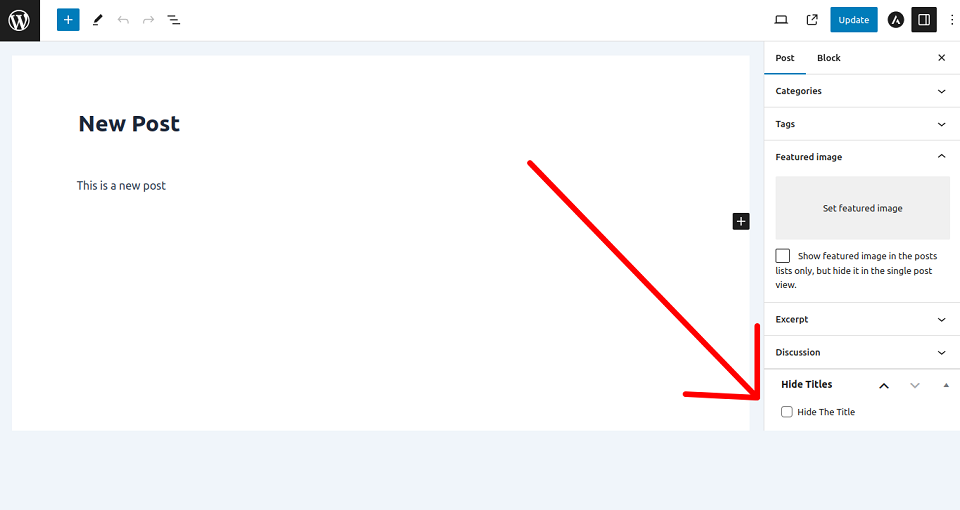
- Override per post or page from the editor
- Navigation menu labels are always preserved
- Clean, responsive settings screen
- No front-end assets, no performance overhead
Ekrānuzņēmumi
Uzstādīšana
Install MM Title Manager via the WordPress Dashboard (from the plugin directory or from your computer), or upload the files manually to your server and activate the plugin.
Install via WordPress dashboard
From the Plugin Directory
- Visit ‘Plugins > Add New’
- Search for ‘MM Title Manager’
- Install and activate the plugin
From Your Computer
- Download the plugin
- Visit ‘Plugins > Add New > Upload Plugin’
- Choose the plugin file in .zip format
- Click the Install Now button, then activate after installation
Install by uploading files manually
- Download the plugin and unzip the folder
- Upload the folder to your ‘/wp-content/plugins/’ directory
- Activate the plugin from the Dashboard
BUJ
-
How do I hide titles on pages and single posts?
-
Activate the plugin, go to the settings page, choose your option, and click ‘Save changes’.
-
How do I bring the titles back?
-
Go to the settings page, choose ‘Show all titles’, and click ‘Save changes’.
-
How do I hide the title on just one post or page?
-
Edit the post or page and enable the “Hide title on this page” box in the MM Title Manager sidebar.
-
No. Menu labels are always preserved, even when the title is hidden.
Atsauksmes


Autori un izstrādātāji
“MM Title Manager — Hide Page and Post Titles” ir atvērtā pirmkoda programmatūra. Šo spraudni ir veidojuši šādi cilvēki.
Līdzdalībnieki
“MM Title Manager — Hide Page and Post Titles” ir tulkots lokalizācijās 5. Paldies tulkotājiem par ieguldījumu.
Tulkot “MM Title Manager — Hide Page and Post Titles” savā valodā.
Vai jūs interesē attīstība?
Pārlūkojiet kodu, apmeklējiet SVN krātuvi vai abonējiet attīstības žurnālu, ko izveidojis RSS.
Izmaiņu žurnāls
1.12
Release Date – 20 August 2026
- Tested with WordPress v7.1
1.11
Release Date – 28 July 2026
- Fixed: global “Hide all titles” no longer affects admin list tables, widgets, or secondary loops — it now targets the main title on single posts and pages only.
- Fixed: the title filter now returns an empty string instead of boolean false.
- Fixed: the migration notice is no longer shown on fresh installs and is now dismissible.
- Fixed: uninstall now removes all plugin options and per-post title meta, leaving no orphaned data.
- Improved: single plugin version constant used for asset cache busting.
- Improved: code now follows the WordPress Coding Standards; added PHPDoc throughout.
- Improved: accessible, semantic markup on the settings screen (valid heading structure, screen-reader labels).
- Improved: compressed bundled images for a lighter package.
- Added: a translation template (languages/hide-titles.pot).
- Changed: minimum PHP raised to 7.4; standardized on GPLv2 or later.
- Tested: WordPress v7.0.2 compatibility.
1.10
Release Date – 11 April 2026
- Fixed: hiding a page title also hid the menu item
- Improved: code maintainability
- Tested: WordPress v7.0-RC2 compatibility
1.9
Release Date – 8 November 2025
- Tested with WordPress v6.9
1.8
Release Date – 15 April 2025
- Tested with WordPress v6.8
1.7
Release Date – 9 April 2024
- Tested with WordPress v6.5
1.6
Release Date – 8 February 2024
- Added new feature
- Tested with WordPress v6.4.3
1.5
Release Date – 7 November 2023
- Tested with WordPress v6.4
1.4
Release Date – 25 September 2023
- Optimized code
1.3
Release Date – 15 September 2023
- Added new setting options
1.2
Release Date – 7 September 2023
- Integrated plugin settings
- Tested with WordPress v6.3.1
1.1
Release Date – 9 August 2023
- Tested with WordPress v6.3
1.0
Release Date – 14 March 2023
- Initial release.