
Apraksts
使用快捷代码[jinshuju]在wordpress中方便又快速的嵌入金数据表单, 登陆到金数据,到您所想要嵌入表单的分享页面,获得嵌入wordpress的代码。
Example:
[jinshuju form=WXDJRa height=458]
Ekrānuzņēmumi
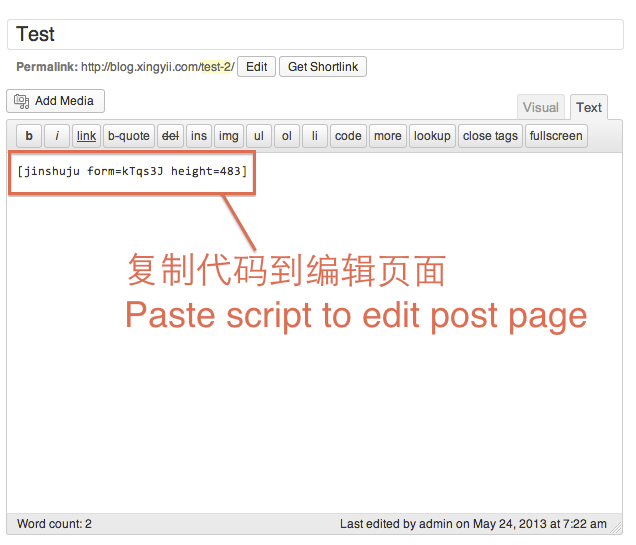
插件使用介绍 
如何获得代码
Uzstādīšana
For old school manual installation people: copy the folder “Jinshuju_shortcode” into the /wp-content/plugins/ folder. Then go to the Plugins area of the Admin and activate. Otherwise, search for “Jinshuju Shortcode Plugin” from the admin area of your WordPress site in Plugins > Add New.
BUJ
- What is Jinshuju?
-
Jinshuju is a web app that helps anybody build amazing online forms. It’s great for people who need to collect data, analyze data and share data quickly, but don’t want to deal with programming or servers.
- Why is this useful?
-
Shortcodes are clean! You can already copy and paste JavaScript or iframe code to embed a Jinshuju form onto a WordPress page, but you need to make sure to be in the “HTML” tab of the writing area. If a user is in the “Visual” (default) tab, the embed code will not work. Short codes will work either way.
Atsauksmes
Par šo spraudni nav atsauksmju.
Autori un izstrādātāji
“金数据” ir atvērtā pirmkoda programmatūra. Šo spraudni ir veidojuši šādi cilvēki.
Līdzdalībnieki
Tulkot “金数据” savā valodā.
Vai jūs interesē attīstība?
Pārlūkojiet kodu, apmeklējiet SVN krātuvi vai abonējiet attīstības žurnālu, ko izveidojis RSS.
Izmaiņu žurnāls
1.0 – 首次发布