
WordPress.org

Latviešu valodā

  • Tēmas
  • Spraudņi
  • Jaunumi
  • Par
  • Iegūstiet WordPress
Iegūstiet WordPress
WordPress.org

Plugin Directory

Login Lockdown & Protection

  • Iesniegt spraudni
  • Mani favorīti
  • Pieslēgties
  • Iesniegt spraudni
  • Mani favorīti
  • Pieslēgties

Login Lockdown & Protection

Autors WebFactory
Lejupielādēt
  • Sīkāka informācija
  • Atsauksmes
  • Uzstādīšana
  • Attīstība
Atbalsts

Apraksts

Login Lockdown records the IP address and timestamp of failed login attempts. If more than a selected number of attempts are detected within a set period of time from the same IP, then the login is disabled for all requests from that IP address (or the IP is completely blocked from accessing the site). This secures the site and helps prevent brute force password attacks & discovery.

The plugin defaults to a 1 hour lock out of an IP block after 3 failed login attempts within 5 minutes. This can be modified in options. Administrators can release locked out IPs manually from the panel. A detailed log is available for all failed login attempts and all IP locks to control lockdown.

Configure the plugin from Settings – Login Lockdown.

Country blocking (PRO feature)

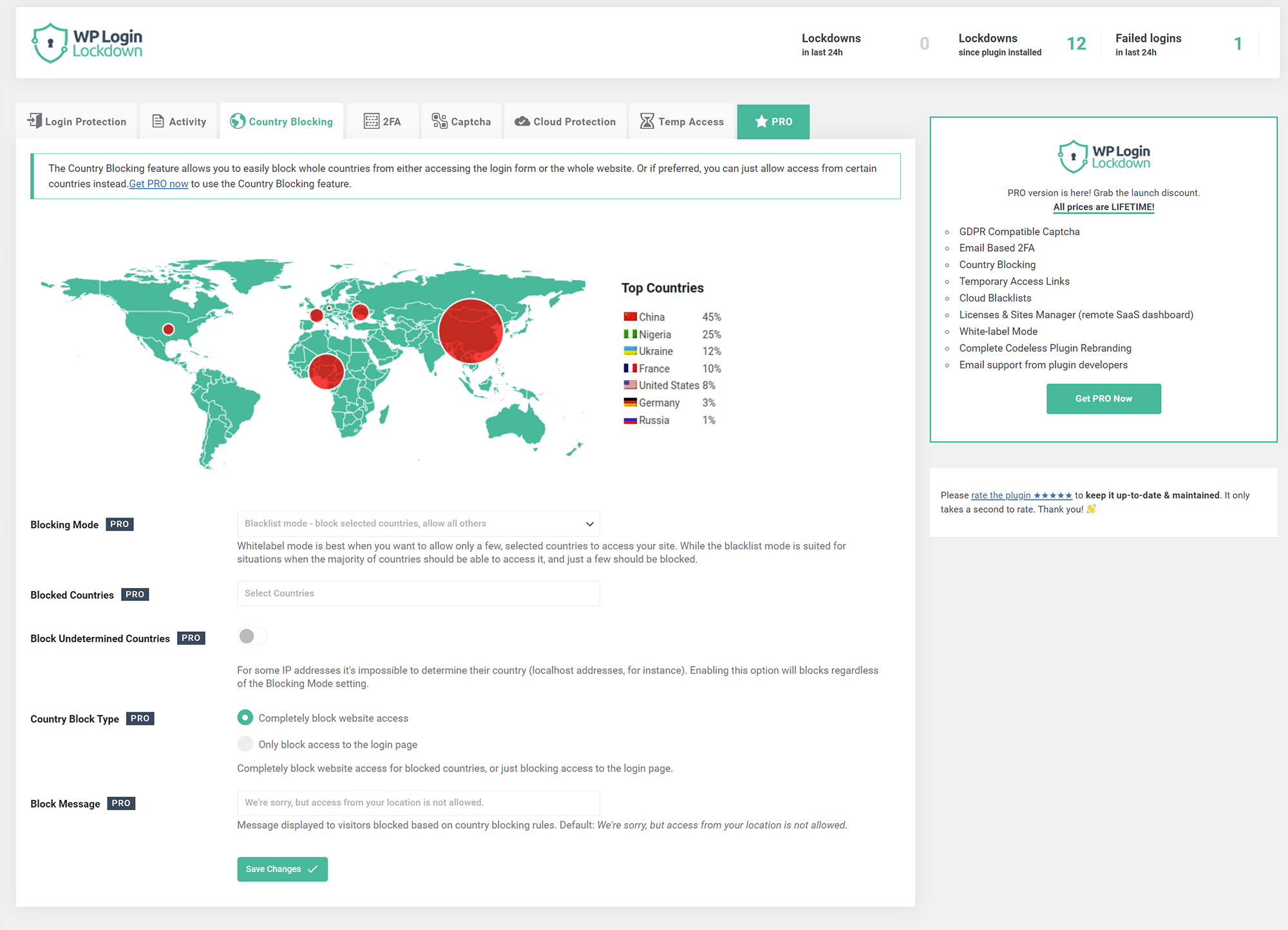
Block unwanted countries from accessing the site, or block them from being able to log in. Display a custom message to blocked visitors so they know why they can’t access the site.

Captcha

The simplest way to get rid of bots and brute-force password attacks. Choose from 5 different versions – built-in one, two from Google (PRO feature), Cloudflare Turnstile, and hCaptcha (PRO feature). Built-in captcha is GDPR compatible.

2FA – Two Factor Authentication (PRO feature)

Provide an extra layer of security without 2FA code generating apps such as Google Authenticator. Even if somebody knows your username & password they won’t be able to log in because it needs to be confirmed by clicking a unique link sent to your email. Since you’re the only one that has access to your inbox, you’ll never get hacked.

Cloud Protection (PRO feature)

Manage IP Whitelists and Blacklists in your Login Lockdown Dashboard (a SaaS service for managing all your sites) and apply them to protect all the sites you manage from a single location.

Temporary Access (PRO feature)

Give temporary access to other people without giving them a username & password. Set the lifetime of the link and the maximum number of times it can be used to prevent abuse. Access level rights can be any you pick – admin, editor, author…

Ekrānuzņēmumi
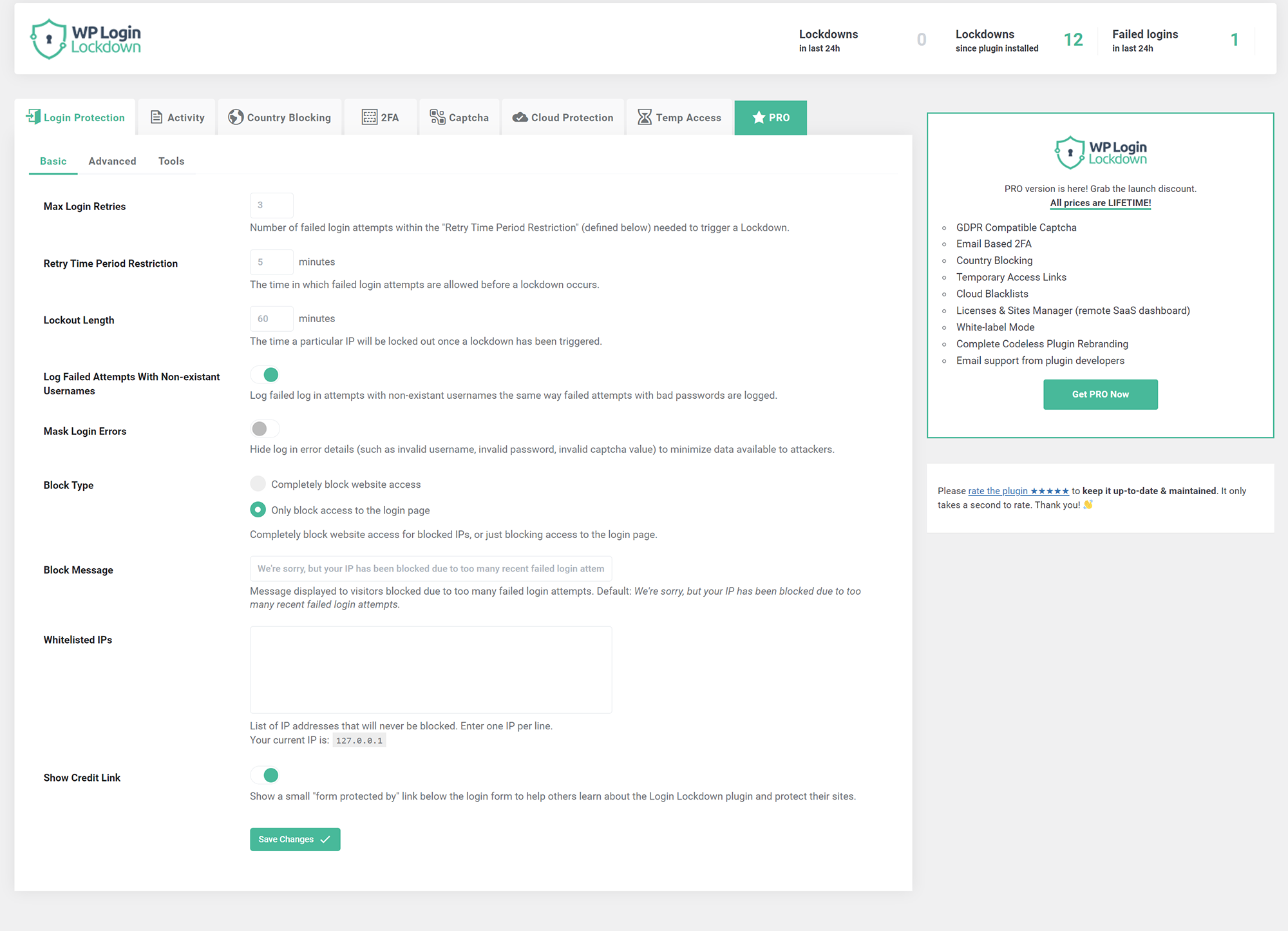
  • Protect the login form by banning IPs with multiple failed login attempts
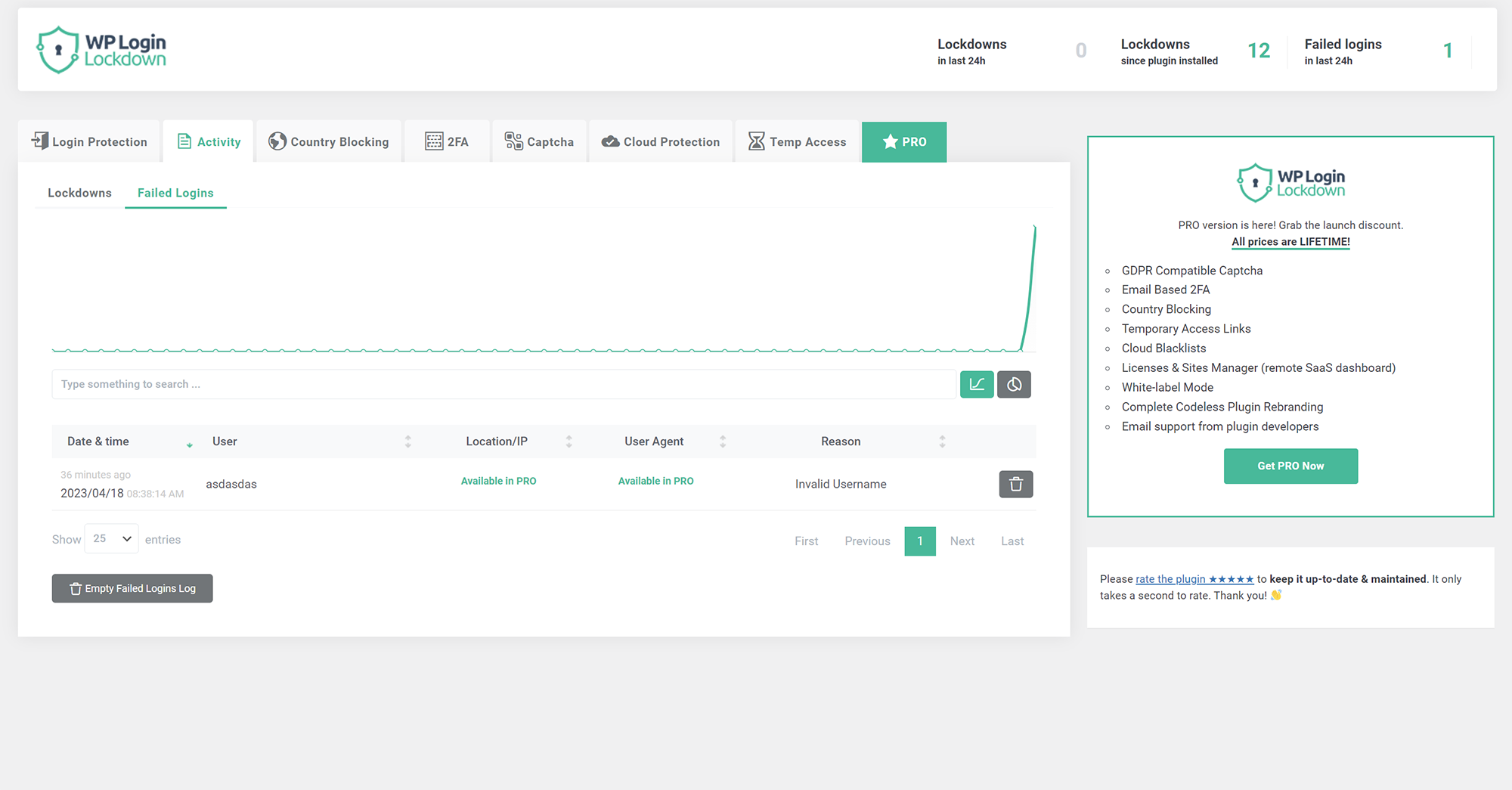
  • Activity shows all failed login attempts and currently banned IPs
  • Country blocking (PRO feature) allows you to block selected countries from accessing the site

Uzstādīšana

  1. Extract the zip file into your plugins directory into its own folder.
  2. Activate the plugin in the Plugin options.
  3. Customize the settings from Settings – Login Lockdown panel.

BUJ

How to disable this plugin?

Just use standard Plugin overview page in WordPress admin section and deactivate it; or rename the plugin folder /wp-content/plugins/login-lockdown/ using FTP access.

Will it slow my site down?

No, it won’t. The majority of the code is only run when logging in.

How can I report security bugs?

You can report security bugs through the Patchstack Vulnerability Disclosure Program. The Patchstack team help validate, triage and handle any security vulnerabilities. Report a security vulnerability.

Atsauksmes

503 Service Unavailable

reverseflash 17 maijs, 2025
This plugin keeps the wp-login.php locked indefinitely even if the 60 minutes have passed.

Free but total adware

FolioVision 22 februāris, 2024
WP Login Lockdown is free. At one point it did its work discreetly. It now auto installs a huge widget in the admin dashboard. In the back it covers the entire interface with huge ads. Almost all of the functionality is now pro and is front row and center, with an interface so covered in pro functions it’s impossible use the free plugin. Frankly this kind of simple functionality should not require a pro plugin at all. A sad example of the slow degradation of the wonderful WordPress developer community into adware and bloatware. Should mark WP Login Lockdown two stars really, but will leave it at three stars as it could be useful if way trimmed back again.

Awesome Plugin, Saved My Servers!

jonahcoyote 24 janvāris, 2024 1 atbilde
This plugin works wonders to protect your WordPress website from brute force attacks. It literally saved my servers where before implementing I had high CPU and memory usage and after installing it cut CPU use by up to 100% and memory by 50%. It’s not perfect and still has some areas to improve (reporting & unblocking are two) but the core functionality works really really well. HIGHLY RECOMMENDED!

Things have started that aren’t quite finished

johnyyw 25 novembris, 2023
The plugin looks promising, but things have started that aren’t quite finished… 1) Captcha – It doesn’t show captcha at “lost password”, “woocommerce product comment”, probably somewhere else and no option to enable or simple to show everywhere.. It shows only at login form.. 2) 2FA – Two Factor Authentication. There is only email 2FA.. this plugin did not offer the option with “2FA code generating apps such as Google Authenticator, Authy”.. which is very sad.. I always use 2FA code generating apps for everything, and I will never use 2FA email authentication by choice! It seems that the author is working on too many projects and this particular one doesn’t have too much time to make the plugin really great! These are the reasons why I don’t use this plugin, if they improve it with this and more other functions, I will give it a chance and install it again. Currently only 3 stars! ★★★✩✩

“Unknown” login attempts after installation

marcioshibukawa 20 jūlijs, 2023
After I installed the plugin, I started getting login attempts by the user “Unknown” (on the 3 sites I installed), detected by Wordfence. This is why I changed the login path through the plugin, so in theory, only they could know the login address.

Great security, updated with new features, responsive support

Jim Krenz 24 jūnijs, 2023
Thus far, I am very happy with the pro version of Login Lockdown. It is not flawless, but the developers are responsive, and they are improving and updating the software regularly. Worth the money for pro!
Lasīt 60 atsauksmi

Autori un izstrādātāji

“Login Lockdown & Protection” ir atvērtā pirmkoda programmatūra. Šo spraudni ir veidojuši šādi cilvēki.

Līdzdalībnieki
  • WebFactory

“Login Lockdown & Protection” ir tulkots lokalizācijās 8. Paldies tulkotājiem par ieguldījumu.

Tulkot “Login Lockdown & Protection&#8221 savā valodā.

Vai jūs interesē attīstība?

Pārlūkojiet kodu, apmeklējiet SVN krātuvi vai abonējiet attīstības žurnālu, ko izveidojis RSS.

Izmaiņu žurnāls

v2.15

  • 2025/11/04
  • security fix

v2.14

  • 2025/08/04
  • performance fixes

v2.13

  • 2025/05/15
  • more “security” fixes

v2.12

  • 2025/05/02
  • security fixes
  • import/export function removed due to security issues

v2.11

  • 2024/07/08
  • minor security fixes

v2.10

  • 2024/05/18
  • made more strings translatable

v2.09

  • 2024/02/09
  • security fix

v2.08

  • 2023/12/09
  • security/fatal error fix

v2.07

  • 2023/11/19
  • security fix

v2.06

  • 2023/05/11
  • minor bug fixes

v2.05

  • 2023/05/09
  • bug fix – IP wasn’t showing in lockdowns and log tables

v2.02

  • 2023/04/24
  • fixed a few captcha bugs
  • added captcha verification when activating it in admin

v2.0

  • 2023/04/18
  • new codebase
  • new GUI
  • new features
  • added captcha
  • introduced PRO version

v1.83

  • 2022/10/04
  • fixed timezone bug

v1.82

  • 2022/09/23
  • WebFactory took over development
  • a full rewrite will follow soon, for now we patched some urgent things
  • prefixed function names that are in global namespace
  • properly escaped all inputs

v1.0

  • 2007/08/29
  • initial release

Meta

  • Versija 2.15
  • Pēdējo reizi atjaunots: pirms 5 dienām
  • Aktīvās instalācijas: 100 000+
  • WordPress versija 4.0 vai jaunāka
  • Pārbaudīts līdz: 6.9
  • PHP versija 5.2 vai jaunāka
  • Valodas

    Dutch, Dutch (Belgium), English (US), Galician, Japanese, Russian, Spanish (Chile), Spanish (Spain), un Swedish.

    Tulkojiet savā valodā

  • Birkas:
    block logincaptchafirewallloginprotect login
  • Papildu skats

Vērtējumi

4.3 no 5 zvaigznēm.
  • 47 5-star reviews 5 zvaigznes 47
  • 0 4-star reviews 4 zvaigznes 0
  • 4 3-star reviews 3 zvaigznes 4
  • 0 2-star reviews 2 zvaigznes 0
  • 9 1-star reviews 1 zvaigzne 9

Pievienot manu atsauksmi

Skatīt visas atsauksmes

Līdzdalībnieki

  • WebFactory

Atbalsts

Jums ir kaut kas ko teikt? Vajadzīga palīdzība?

Skatīt atbalsta forumu

  • Par
  • Jaunumi
  • Uzturētājs
  • Privātums
  • Vitrīna
  • Tēmas
  • Spraudņi
  • Modeļi
  • Uzziniet
  • Atbalsts
  • Izstrādātāji
  • WordPress.TV
  • Iesaistieties
  • Pasākumi
  • Ziedot
  • Pieci nākotnei
  • WordPress.com
  • Matt
  • bbPress
  • BuddyPress
WordPress.org
WordPress.org

Latviešu valodā

  • Apmeklējiet mūsu X (agrāk Twitter) kontu
  • Apmeklējiet mūsu Bluesky kontu
  • Apmeklējiet mūsu Mastodon kontu
  • Apmeklējiet mūsu Threads kontu
  • Apmeklējiet mūsu Facebook lapu
  • Apmeklējiet mūsu Instagram kontu
  • Apmeklējiet mūsu LinkedIn kontu
  • Apmeklējiet mūsu TikTok kontu
  • Apmeklējiet mūsu YouTube kanālu
  • Apmeklējiet mūsu Tumblr kontu
Kods ir dzeja.