WordPress.org

Latviešu valodā

  • Tēmas
  • Spraudņi
  • Jaunumi
  • Par
  • Iegūstiet WordPress
Iegūstiet WordPress
WordPress.org

Plugin Directory

Login Logo

  • Iesniegt spraudni
  • Mani favorīti
  • Pieslēgties
  • Iesniegt spraudni
  • Mani favorīti
  • Pieslēgties

Šī spraudnis nav atjaunināts vairāk kā divus gadus. Varbūt, tas vairs netiek uzturēts, nesaņemt atbalstu un tam var būt saderības problēmas ar jaunākām WordPress versijām.

Login Logo

Autors Mark Jaquith
Lejupielādēt
  • Sīkāka informācija
  • Atsauksmes
  • Uzstādīšana
  • Attīstība
Atbalsts

Apraksts

This plugin allows you to customize the logo on the WordPress login screen. There is zero configuration. You just drop the logo file into your WordPress content directory, named login-logo.png and this plugin takes over.

Note that you should use a transparent background on the PNG image, crop it tightly (no padding pixels) and use a width of exactly 312 pixels for best results. Wider images will be downscaled in modern browsers, but it isn’t recommended to rely on that.

This plugin also works in the mu-plugins directory.

Ekrānuzņēmumi
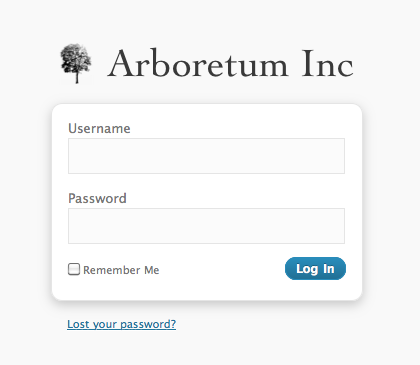
  • A login screen with a custom logo

  • A source image

Uzstādīšana

  1. Install the plugin and activate it.

  2. Create a PNG image with a transparent background, tightly cropped, with a recommended width of 312 pixels.

  3. Upload the PNG image to your WordPress content directory (/wp-content/, by default), and name the file login-logo.png.

  4. If you have a multisite install with more than one network, you can also use login-logo-network-{NETWORK ID}.png to assign a different login logo to each network.

  5. If you have a multisite install, you can also use login-logo-site-{$blog_id}.png to assign a different login logo to each site.

  6. Done! The login screen will now use your logo.

Atsauksmes

UPDATE: Now working with 6.7.1

paywall 21 novembris, 2024
Plugin is no longer working after 6.7. Doesn’t appear to be supported any longer. UPDATE: Plugin is now working with 6.7.1.

Not Working in WordPress 6.7

creoideas 20 novembris, 2024
Not Working in Wordpress 6.7

Do not work on WordPress 6.7

botwan 14 novembris, 2024 1 atbilde
I uploaded as usual the login-logo.png in wp-content folder, but on wordpress 6.7 do not work anymore.

Me encanta

javigandia 8 marts, 2022
Muchas gracias por el trabajo realizado.

Works flawlessly on WP v4.x

ellencarnahan 14 novembris, 2017
Until WP drastically revamps their login structure, I predict this plugin will work seamlessly for many many versions yet to come. Since I found this plugin via Password Protected, it seems only fair to give that one a shout out as well. They work perfectly in sync together. Site access and dashboard login pages both look nice and neat, just the way I like it 🙂 Thank you!

Nice Job

jPapadi 27 novembris, 2016
Welldone
Lasīt 62 atsauksmes

Autori un izstrādātāji

“Login Logo” ir atvērtā pirmkoda programmatūra. Šo spraudni ir veidojuši šādi cilvēki.

Līdzdalībnieki
  • Mark Jaquith

“Login Logo” ir tulkots lokalizācijās 3. Paldies tulkotājiem par ieguldījumu.

Tulkot “Login Logo&#8221 savā valodā.

Vai jūs interesē attīstība?

Pārlūkojiet kodu, apmeklējiet SVN krātuvi vai abonējiet attīstības žurnālu, ko izveidojis RSS.

Izmaiņu žurnāls

0.10.2

  • Bumped supported version

0.10.0

  • Updated depreciated filter “login_headertitle” to “login_headertext” with compatibility for older WordPress versions
  • Tested with WordPress 5.2.1

0.7

  • The “title” attribute of the header link matches the WordPress site title instead of saying “Powered by WordPress”.
  • The URL for the login logo includes “versioning” based on last file modification date, for browser cache flushing.

0.6

  • You can provide login-logo-site-{$blog_id}.png to have a different logo per multisite site.
  • Support for WordPress 3.4
  • Changed the ideal image width to 312 pixels, and instituted a tighter crop policy.

0.5

  • Support for WordPress 3.3
  • Fix a bug in CSS resizing of oversized images

0.4

  • Use HTTPS if is_ssl() on the login page.

0.3

  • The login logo now links to your site, instead of WordPress.org
  • If you don’t have a custom login logo, the plugin does nothing.
  • You can provide login-logo-network-{NETWORK ID}.png to have a different logo per multisite network.

0.2

  • Do not use background-size unless the image is more than 326 pixels

0.1

  • Original version

Meta

  • Versija 0.10.3
  • Pēdējo reizi atjaunots: pirms 1 gada
  • Aktīvās instalācijas: 40 000+
  • WordPress versija 5.1.2 vai jaunāka
  • Pārbaudīts līdz: 6.6.4
  • Valodas

    English (Canada), English (UK), English (US), un Russian.

    Tulkojiet savā valodā

  • Birkas:
    custom logocustomizeloginlogin screenlogo
  • Papildu skats

Vērtējumi

4.9 no 5 zvaigznēm.
  • 57 5-star reviews 5 zvaigznes 57
  • 3 4-star reviews 4 zvaigznes 3
  • 1 3-star review 3 zvaigznes 1
  • 0 2-star reviews 2 zvaigznes 0
  • 1 1-star review 1 zvaigzne 1

Pievienot manu atsauksmi

Skatīt visas atsauksmes

Līdzdalībnieki

  • Mark Jaquith

Atbalsts

Jums ir kaut kas ko teikt? Vajadzīga palīdzība?

Skatīt atbalsta forumu

Ziedojiet

Vai vēlaties atbalstīt šī spraudņa pilnveidošanu?

Ziedojiet šim spraudnim

  • Par
  • Jaunumi
  • Uzturētājs
  • Privātums
  • Vitrīna
  • Tēmas
  • Spraudņi
  • Modeļi
  • Uzziniet
  • Atbalsts
  • Izstrādātāji
  • WordPress.TV
  • Iesaistieties
  • Pasākumi
  • Ziedot
  • Pieci nākotnei
  • WordPress.com
  • Matt
  • bbPress
  • BuddyPress
WordPress.org
WordPress.org

Latviešu valodā

  • Apmeklējiet mūsu X (agrāk Twitter) kontu
  • Apmeklējiet mūsu Bluesky kontu
  • Apmeklējiet mūsu Mastodon kontu
  • Apmeklējiet mūsu Threads kontu
  • Apmeklējiet mūsu Facebook lapu
  • Apmeklējiet mūsu Instagram kontu
  • Apmeklējiet mūsu LinkedIn kontu
  • Apmeklējiet mūsu TikTok kontu
  • Apmeklējiet mūsu YouTube kanālu
  • Apmeklējiet mūsu Tumblr kontu
Kods ir dzeja.