
Apraksts
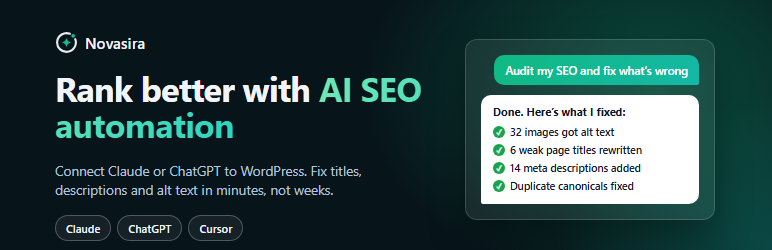
Rank better with AI SEO automation. Connect ChatGPT or Claude to WordPress and let it audit your site, then fix titles, meta descriptions and image alt text for you.
Novasira is an AI SEO plugin built around MCP, the open standard that lets an
AI assistant work inside your site. Connect Claude, ChatGPT, Claude Code,
Cursor, VS Code, GitHub Copilot, Windsurf, Codex, Gemini CLI or any other MCP
client, and ask it to do your SEO. It sees what a crawler cannot, including
drafts, private pages and every image’s alt text, finds what is holding your
pages back, lists the fixes in order of importance, and makes the changes when
you say go.
No API key. No account. No monthly fee. No data leaves your site.
An honest note
No plugin can promise rankings, AI citations or traffic, and Novasira does not.
What it does is find and fix the on-site problems that keep good pages from
ranking: missing titles and descriptions, images with no alt text, orphaned
pages, broken canonicals, weak structure for AI answers. It will not invent
traffic numbers, keyword volumes or a “citation score”.
Works alongside Yoast SEO, Rank Math and SEOPress
Keep the SEO plugin you already use. Novasira reads the titles and descriptions
that Yoast SEO, Rank Math and SEOPress store, so its report matches what your
site really outputs. It does not replace them, convert between them or change
their settings, and it adds nothing to your pages: no front-end scripts, styles
or markup.
AI SEO audit with a ranked fix list
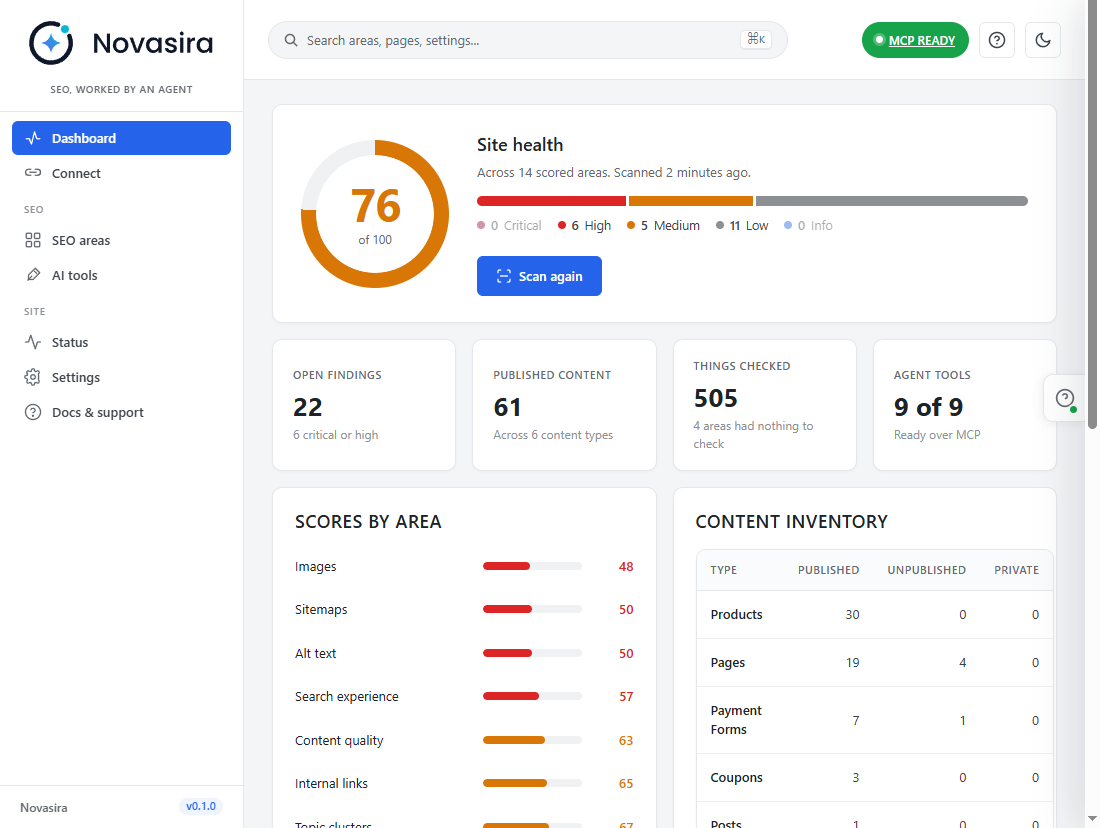
- Site health score across every area it can scan on your site.
- What to fix first, worst problem first, with the cheapest wins on top.
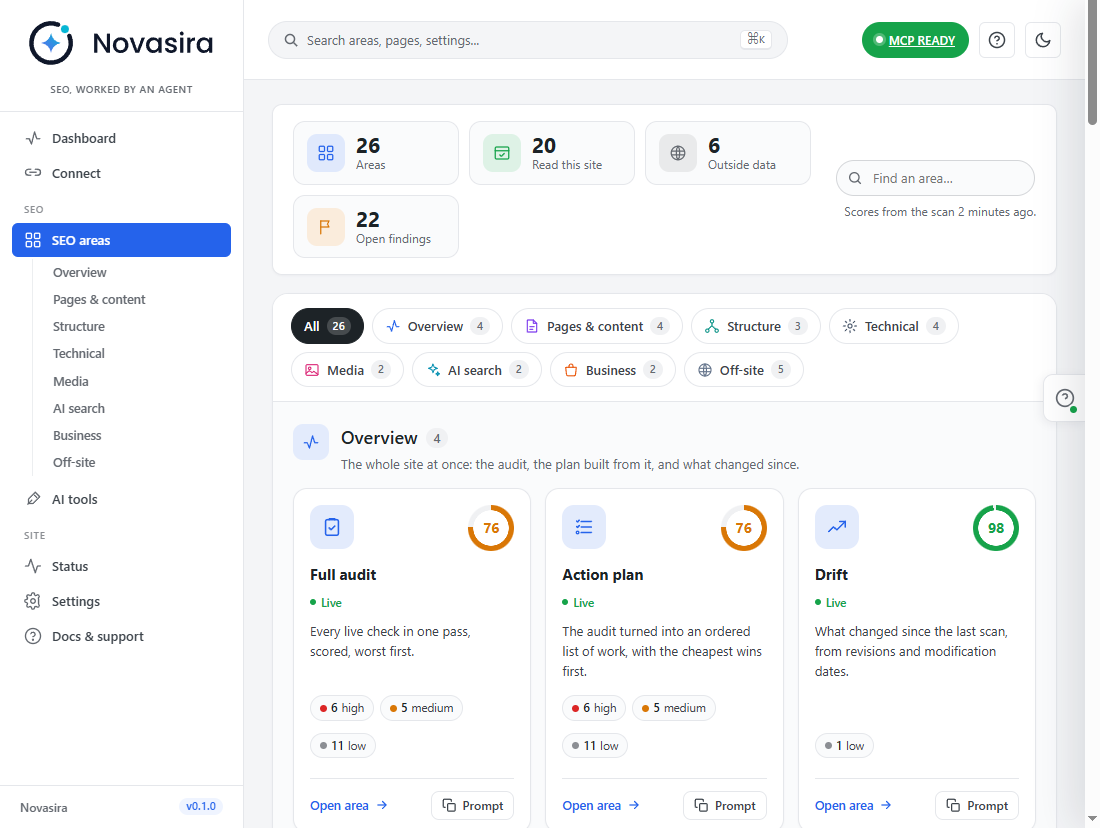
- Twenty-six SEO areas with written guidance and a prompt you can copy:
full audit, action plan, single page, content quality, content briefs,
topic clusters, internal links, programmatic pages, technical SEO, sitemaps,
schema, languages, images, alt text, search experience, AI search, agent
readability, drift, products and local SEO.
Fix titles, meta descriptions and alt text with ChatGPT or Claude
- Ask your AI to find every image with no alt text and write good ones.
- Ask which pages have a missing, duplicate or weak title or meta description.
- Ask it to rewrite a page’s title, description, canonical URL or slug, and
show you the change before it saves. - Every write needs an explicit call naming the post or image, a connection you
gave the write permission, and a user who could edit that item by hand.
AEO and GEO: be the answer AI search quotes
Answer Engine Optimization (AEO) and Generative Engine Optimization (GEO) are
the same fundamentals applied to ChatGPT, Claude, Perplexity, Gemini and Google
AI Overviews. Novasira checks what WordPress can see:
- Whether a page opens with a direct answer and uses question-style headings.
- Self-contained answer blocks, lists and tables, bylines, and published and
modified dates. - Whether author profiles are filled in.
- Your robots rules for AI crawlers, and whether an
llms.txtfile exists. - Whether an agent can actually read your pages, or whether the content is
assembled in the browser and invisible to it.
Schema, sitemap and internal link checks
- Read the schema markup on a page and spot what is missing or inconsistent.
- See which pages your sitemap leaves out.
- Find orphaned pages that nothing links to, and pages that deserve more links.
Connect any AI tool over MCP
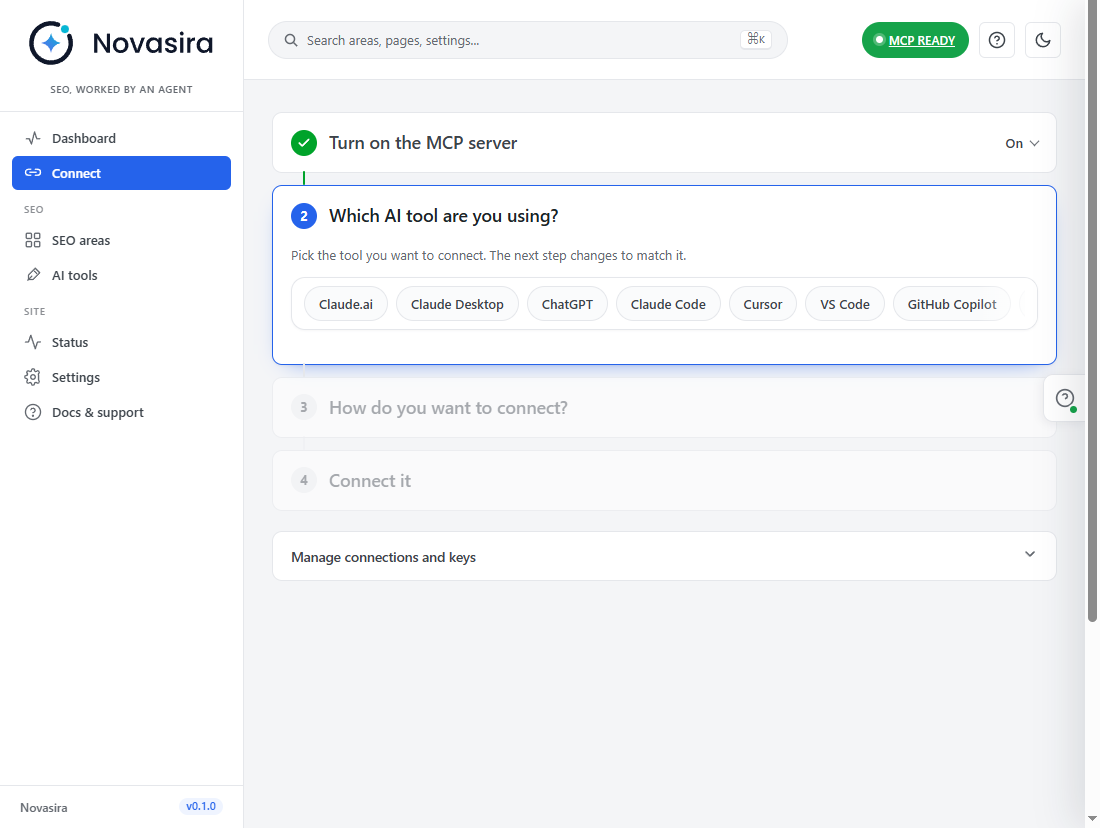
Novasira Connect walks you through it in a few steps and gives you
ready-made setup for each tool. Sign in with WordPress (OAuth 2.1) with
per-connection permissions, or use an application password limited to
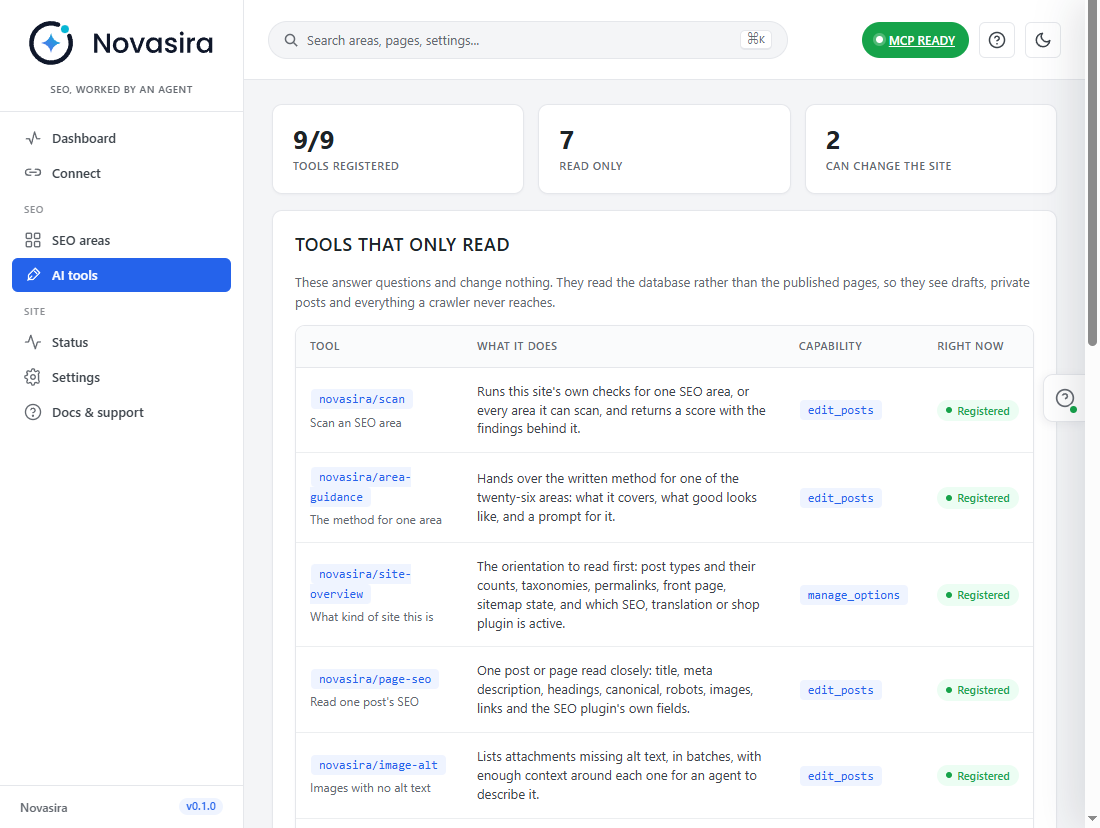
Novasira’s own endpoint. Nine MCP tools are exposed: scan an area, read the
method, read a site overview, read a page’s SEO, list images with no alt text,
check internal links, read schema, and write SEO fields or alt text.
Safe by design
- The endpoint carries Novasira’s own tools and nothing else. No tool installs
or changes plugins, themes, users or site settings. - The agent can write only SEO fields (titles, meta descriptions, canonical
URLs, slugs, robots flags) and image alt text. - You choose the permissions on the sign-in screen and can revoke any
connection at any time. - No outbound requests, no telemetry, no licence server.
Twenty-six areas
The plugin organises its work into twenty-six SEO areas. Twenty of them are
live: WordPress holds the data, so the area can be scanned against this
site. Six are advisory: the answer lives outside your site, so the area
ships the method and the prompt and says so plainly.
Live areas: full audit, action plan, single page, content quality, content
brief, topic clusters, internal links, programmatic pages, technical, sitemaps,
schema, languages, images, alt text, search experience, AI search, agent
readability, drift, products, local.
Advisory areas: Search Console, backlinks, competitors, keyword data, maps
listing, and the orchestrator page that says which area answers which question.
The advisory split is deliberate. Impressions, rankings, referring domains and
keyword volumes are not stored anywhere in WordPress. Novasira ships no
API key, no crawler and no bundled data service, so for those areas it gives you
the method and the prompt rather than a number it would have had to invent.
Guidance, not a score
Every area carries a written guidance document, which an agent reads through an
MCP tool. Each one answers the same five questions: what the area is about, what
Novasira can actually see from inside WordPress, how to tell a real problem from
a number that merely looks bad, what to do about it cheapest-first, and how you
would know you were wrong.
In the admin, each area has a card naming what it covers, whether it is live or
advisory, and a prompt you can copy and hand to your agent.
That last question is the point. A finding without a falsifiability check is a
guess with a chart next to it.
The agent side
Novasira registers its tools as WordPress abilities and serves them over a
single MCP endpoint on your own site, using the bundled wordpress/mcp-adapter
(GPL-2.0-or-later). You connect your agent to your site; nothing is brokered
through a third party.
Only an authenticated user with the required capability can reach the endpoint.
Novasira Connect walks through it in a few steps: switch the MCP server
on, pick your AI tool (Claude, ChatGPT, Claude Code, Cursor, VS Code, GitHub
Copilot, Windsurf, Codex, Gemini CLI and more), choose how it signs in, and copy
the ready-made connection for that tool. An agent can sign in in either of two
ways:
- Sign in with WordPress (OAuth 2.1). Clients that support MCP
authorization, such as Claude, discover the sign-in automatically. An
administrator approves each connection on a consent screen, choosing which
permissions it gets (read, write, manage), and can revoke it at any time from
Novasira Connect. This uses dynamic client registration, so any client
can ask to connect; nothing is granted until an administrator approves. - Application password. Works with every client and every host. The Connect
screen can create one for you through WordPress core’s own application
password API, named “Novasira…”, and puts it straight into a prompt and a
config snippet for the tool you picked. The password is shown once, in that
page view only; Novasira never stores it (WordPress keeps only its hash, as it
does for any application password). A key created here is accepted only on
Novasira’s MCP endpoint: WordPress refuses it on every other REST route and
on XML-RPC. Keys created here are listed, and can be revoked, under
Manage connections and keys.
Either way, the agent reaches Novasira’s own tools and nothing else. They read
your content and SEO data, and write only SEO fields: titles, meta
descriptions, canonical URLs, slugs and image alt text. The endpoint does not
carry the MCP adapter’s generic tools for running other plugins’ abilities, and
no tool installs or changes plugins, themes, users or site settings. There is no
Novasira server: the agent you choose connects straight to your site.
For OAuth connections Novasira stores, on your own site: the registered
client’s name and redirect addresses, and for each approved connection a hash
of its access and refresh tokens (never the tokens themselves), the permissions
granted, timestamps, and the IP address it last connected from. Access tokens
last 30 days and renew while in use; an unused connection expires after 180
days. A token is accepted only on Novasira’s own MCP endpoint, never on the
rest of the REST API.
Everything the agent can read, that user could already read in wp-admin, and a
tool that edits a post refuses anybody who could not edit that post by hand.
Credits
wordpress/mcp-adapterandwordpress/php-mcp-schemaby the WordPress AI
Team (GPL-2.0-or-later), bundled unmodified invendor/. Sources:
https://github.com/WordPress/mcp-adapter and
https://github.com/WordPress/php-mcp-schema
External services
Novasira makes no outbound requests at all. It contacts no API, no licence
server, no update service, no analytics endpoint and no CDN, and sends nothing
anywhere. There is no account to create and no key to enter. The only personal
data it stores is described under “The agent side” above (the last IP address of
each OAuth connection), kept on your own site; suggested privacy-policy text
is added under Settings Privacy.
The Connect screen has two buttons that open a third-party website in a new
tab, only when you click them. Nothing is sent automatically:
- Add the connector to Claude.ai opens claude.ai’s connector settings, with this site’s MCP
endpoint address and site name in the link so you do not have to type them.
Provided by Anthropic. Terms: https://www.anthropic.com/legal/consumer-terms ·
Privacy: https://www.anthropic.com/legal/privacy - Open ChatGPT connectors opens chatgpt.com’s connector settings. Provided by OpenAI.
Terms: https://openai.com/policies/terms-of-use · Privacy:
https://openai.com/policies/privacy-policy
The plugin bundles wordpress/mcp-adapter (GPL-2.0-or-later, by the WordPress
AI Team) and wordpress/php-mcp-schema. The adapter’s role is to serve an
MCP endpoint on this site — an inbound route under this site’s own REST API. It
does not call out either. Reaching that endpoint requires authenticating as a
user with the capability described above; an unauthenticated request gets
nothing.
The application-password connection snippets tell your AI client to start
@automattic/mcp-wordpress-remote with npx. That is an open-source npm
package (MIT licence, by Automattic) which your own computer downloads from
the npm registry when the client starts it; Novasira does not download, bundle
or run it. It connects only to this site’s MCP endpoint, using the credentials
in the snippet. Source: https://github.com/Automattic/mcp-wordpress-remote ·
npm terms: https://docs.npmjs.com/policies/terms · npm privacy:
https://docs.npmjs.com/policies/privacy
If you connect an AI agent to that endpoint, the agent is software you chose and
run, and whatever it reads from your site travels wherever you have configured
it to travel. That is a property of your agent and your MCP client, not of this
plugin. Novasira itself never initiates a connection.
Ekrānuzņēmumi
Uzstādīšana
- Upload the plugin to
/wp-content/plugins/novasira/, or install it from the Plugins screen. - Activate it. There is nothing to install: no tables are created and no settings are required.
- Open Novasira in the admin menu. The Dashboard shows what the site looks like; SEO areas lists all twenty-six with their guidance.
- To work with an agent, open Connect and follow the steps: pick your AI tool, choose Sign in or Application password, and copy what the last step gives you into the tool.
WordPress 6.9 or later is required: the Abilities API that Novasira registers its tools with is part of WordPress core from 6.9.
BUJ
-
Is Novasira free? Is there a Pro version?
-
Novasira is free, with no paid version, no upsell and no licence key. You do
not pay anything to Novasira to run it. If your AI tool charges for its own use,
that is between you and that tool. -
How does Novasira work?
-
Novasira runs inside your WordPress site. It scans what your site holds about its
own SEO, ranks the problems, and exposes nine tools over MCP. You connect an AI
assistant such as ChatGPT or Claude to those tools. The assistant reads the
findings and the written method, and fixes what you ask it to fix. Nothing is
brokered through a third party. -
How do I connect ChatGPT, Claude or Cursor to my WordPress site?
-
Open Novasira Connect, pick your AI tool, choose Sign in or Application
password, and copy what the last step gives you into the tool. Clients that
support MCP sign-in, such as Claude, find the sign-in on their own. -
What is MCP?
-
The Model Context Protocol is an open standard that lets an AI assistant
discover and call tools on another system. Novasira runs an MCP server on your
own site, so the assistant talks to your site directly. -
Which AI tools work with it?
-
Any MCP client. The Connect screen has ready-made setup for ChatGPT, Claude,
Claude Desktop, Claude Code, Cursor, VS Code, GitHub Copilot, Windsurf, Codex,
Gemini CLI and more. -
Do I need an API key?
-
No. Novasira has no API key and no account. You need an AI assistant that
supports MCP, and whatever plan that assistant requires. -
Will Novasira conflict with Yoast SEO, Rank Math or SEOPress?
-
No. Novasira does not output titles, descriptions or schema to your visitors, so
there is nothing to clash. It reads what Yoast SEO, Rank Math and SEOPress have
stored and reports on it. It does not change their settings. -
Is it safe to let an AI change my site?
-
The agent reaches Novasira’s own tools and nothing else. They read your content
and SEO data, and write only SEO fields (titles, meta descriptions, canonical
URLs, slugs, robots flags) and image alt text. No tool installs or changes
plugins, themes, users or site settings. You choose the permissions on the
sign-in screen, and you can revoke any connection from Novasira Connect. -
Will it change my content without asking?
-
Only when asked. Reading is the default. Two tools write: one sets a single
page’s SEO fields (title, description, canonical URL, slug, noindex and
nofollow), and one sets an image’s alt text. Each takes an explicit call naming
the post or image, needs a connection granted the write permission, and refuses
anyone who could not edit that item by hand. The prompts the plugin supplies
tell the agent to show you the change and wait. -
Does Novasira write my content?
-
No. Your AI assistant does the writing and Novasira saves SEO fields and alt
text where you tell it to. It does not generate articles. -
What is Answer Engine Optimization (AEO)?
-
Making your pages easy for answer engines such as ChatGPT, Perplexity and Google
AI Overviews to understand and quote: direct answers, clear headings, lists and
tables, named authors and dates. Novasira checks these signals on your own
content. -
What is Generative Engine Optimization (GEO)?
-
The same goal as AEO from another angle: becoming a source that generative AI
engines choose to cite. In practice it is good SEO fundamentals plus content
that is structured for answers. Novasira’s AI search area covers what WordPress
can see. -
Does Novasira create an llms.txt file?
-
No. It checks whether an
llms.txtfile exists and reads your robots rules for
AI crawlers, then tells your agent what it found. It does not create or edit
those files. -
Does it promise better rankings?
-
No. No plugin can. Novasira reports what your site contains and what the method
says about it. What search engines and AI engines do with your site afterwards
is not something this plugin, or any plugin, controls. -
Will it slow down my site?
-
No. Novasira adds nothing to your pages: no front-end scripts, styles or markup.
It does its work in wp-admin and on its own MCP endpoint, and scans run only
when you or your agent ask for one. -
Does it work without an AI agent?
-
Partly. The admin screens show each area’s findings and guidance, and you can
act on them by hand. The tools are only useful with an MCP client connected, and
the advisory areas are mostly a method and a prompt, which is of more use to an
agent than to a dashboard. -
Do the advisory areas work if I have no API keys?
-
They give you the method, the prompt and an honest statement about where the
numbers live. They do not produce numbers. If your agent has its own access to
Search Console, a keyword data provider or the open web, it can bring the
numbers; the plugin will not pretend to. -
Does it work with WooCommerce and multilingual sites?
-
Novasira has areas for products and for languages (hreflang), and reads product
and translation data where it is present. Coverage depends on the plugins your
site uses, and the Status screen shows what it found. -
Does Novasira send my site’s data anywhere?
-
No. The plugin makes no outbound HTTP requests of any kind. It has no update
server, no licence check, no analytics and no telemetry. See the External
services section below. -
Where is my data stored?
-
On your own site. The only personal data Novasira keeps is described under “The
agent side” above: the last IP address of each OAuth connection. -
What do I need to run it?
-
WordPress 6.9 or later (the Abilities API Novasira registers its tools with is
part of core from 6.9) and PHP 8.0 or later. Application passwords need HTTPS
unless the site is a local environment. The Status screen checks all of this and
says how to fix anything that is wrong. -
How do I check that it is working?
-
Open Novasira Status. It runs a series of checks on the MCP server, the
tools, the endpoint, permalinks, HTTPS, application passwords and the
Authorization header, and gives a fix for each failure. -
Which capability is required?
-
By default:
- The Novasira admin menu, Connect, Status and Settings require an
administrator (manage_options). Only an administrator can approve an OAuth
connection. - Reading through the MCP tools, and the Tools and Docs screens, require
edit_posts. Writing through the MCP tools also requiresedit_posts, plus
permission to edit the specific post or image.
Both MCP capabilities can be raised under Novasira Settings to
publish_posts,edit_others_postsormanage_options. They cannot be lowered
belowedit_posts, so subscribers can never reach the tools. - The Novasira admin menu, Connect, Status and Settings require an
-
How do I uninstall it cleanly?
-
Deactivate and delete the plugin. Deleting removes its settings, its sign-in
connections and the application passwords its Connect screen created. No tables
were created, so nothing else is left behind. -
Is the source code available?
-
Yes. Novasira is released under GPL-2.0-or-later and the full source is in the
plugin ZIP, including the bundled MCP adapter.
Atsauksmes
Par šo spraudni nav atsauksmju.
Autori un izstrādātāji
“Novasira – AI SEO Automation, AEO, Schema and MCP for ChatGPT and Claude” ir atvērtā pirmkoda programmatūra. Šo spraudni ir veidojuši šādi cilvēki.
Līdzdalībnieki

Tulkot “Novasira – AI SEO Automation, AEO, Schema and MCP for ChatGPT and Claude” savā valodā.
Vai jūs interesē attīstība?
Pārlūkojiet kodu, apmeklējiet SVN krātuvi vai abonējiet attīstības žurnālu, ko izveidojis RSS.
Izmaiņu žurnāls
0.1.3
- New plugin name and a fuller description, with AEO and GEO sections.
- Expanded FAQ.
0.1.2
- Plain-language description and a new banner.
0.1.1
- Clearer plugin name and description.
- Status screen no longer reports a false problem for the MCP server and tools on a normal admin page load.
0.1.0
- First release.
- Twenty-six SEO areas: twenty live against WordPress data, six advisory.
- Written guidance for every area, read by an agent through an MCP tool.
- Scanning for pages, content, content briefs, topic clusters, internal links,
programmatic pages, technical, sitemaps, languages, images and search
experience, plus the audit and action plan composed from them. - MCP endpoint served on this site through the bundled
wordpress/mcp-adapter. - Reads titles, descriptions, robots flags and canonicals stored by Yoast SEO,
Rank Math and SEOPress where one of them is installed. - Sign in with WordPress: OAuth 2.1 with PKCE and per-connection permissions,
alongside application passwords. - A step-by-step Connect screen with ready-made setup for seventeen AI tools,
and application passwords created and revoked in place. - Deleting the plugin removes its settings, sign-in connections and the
application passwords its Connect screen created. - No outbound requests, no telemetry, no account.