

Apraksts
Plugins Genius allows you to choose which plugins should be active in the frontend and in the backend.
Some plugins affects only the frontend, some only the backend of WordPress and some of them make WordPress slow.
Now you can tune your WordPress site, actvating plugins only where you need.
- Author: Marco Canestrari
Ekrānuzņēmumi

When Plugins Genius is active, standard plugins page is like that: all plugins inactive except Plugins Genius. 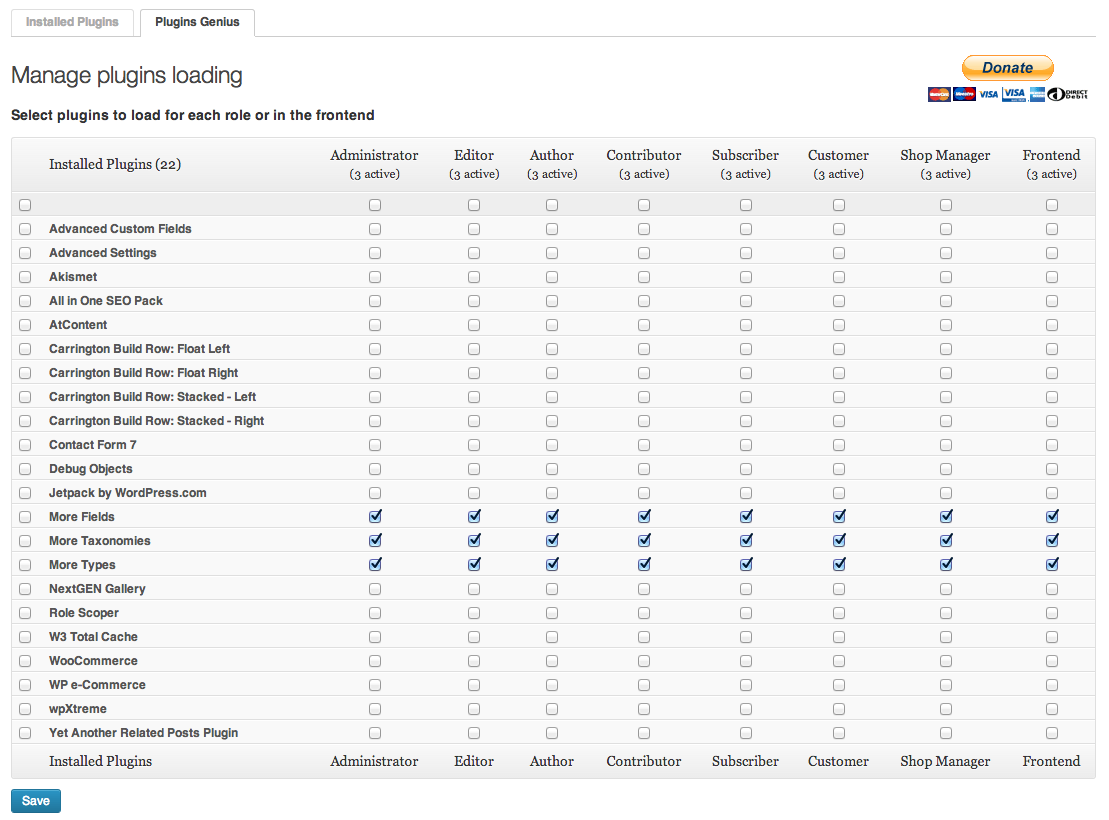
You can select active plugin from Plugins Genius configuration page.
Uzstādīšana
- Upload the files to the /wp-content/plugins/plugins-genius/ directory.
- Activate the plugin through the ‘Plugins’ menu in WordPress.
- Go to “Plugins Genius” tab and select which plugin should be active for each role
Atsauksmes

8 novembris, 2016
Works great and simple

3 septembris, 2016
That’s exactly what I was looking for and works very well.
Autori un izstrādātāji
“Plugins Genius” ir atvērtā pirmkoda programmatūra. Šo spraudni ir veidojuši šādi cilvēki.
Līdzdalībnieki
Tulkot “Plugins Genius” savā valodā.
Vai jūs interesē attīstība?
Pārlūkojiet kodu, apmeklējiet SVN krātuvi vai abonējiet attīstības žurnālu, ko izveidojis RSS.
Izmaiņu žurnāls
2.1.1
- Fixed a bug that caused frontend ajax action for anonymous users not to work
2.1.0
- Hooked get_option(‘active_plugins’) to return role-based active plugins
- Role-based active plugins displayed on classic plugins page
2.0.0
- Plugin Genius code is now Object Oriented
- Activaction hooks are now fired when a new plugin is activated within Plugins Genius
- Fixed a bug that caused some plugins not beeing correctly loaded
1.0.0
- Added nonce security
- Tested on WordPress 3.5.2
0.9.7
- Fixed bug causing fatal error on wp_get_current_user() function
0.9.6
- Security fix
0.9.5
- First release