
Apraksts
StatsTracker – Download Status Viewer is a lightweight WordPress plugin that allows site administrators to view download statistics of selected WordPress.org plugins.
The plugin fetches data directly from WordPress.org on demand and displays clear download metrics, making it easy to analyze plugin popularity and trends.
Features:
– Track up to 50 selected plugins
– Displays the following statistics:
– Total downloads
– Active installs
– Fetches data only when the button is clicked
– View results from:
– Admin dashboard
– Frontend via shortcode
– Clean, easy-to-read table layout
Ekrānuzņēmumi

Example of setting’s page output. 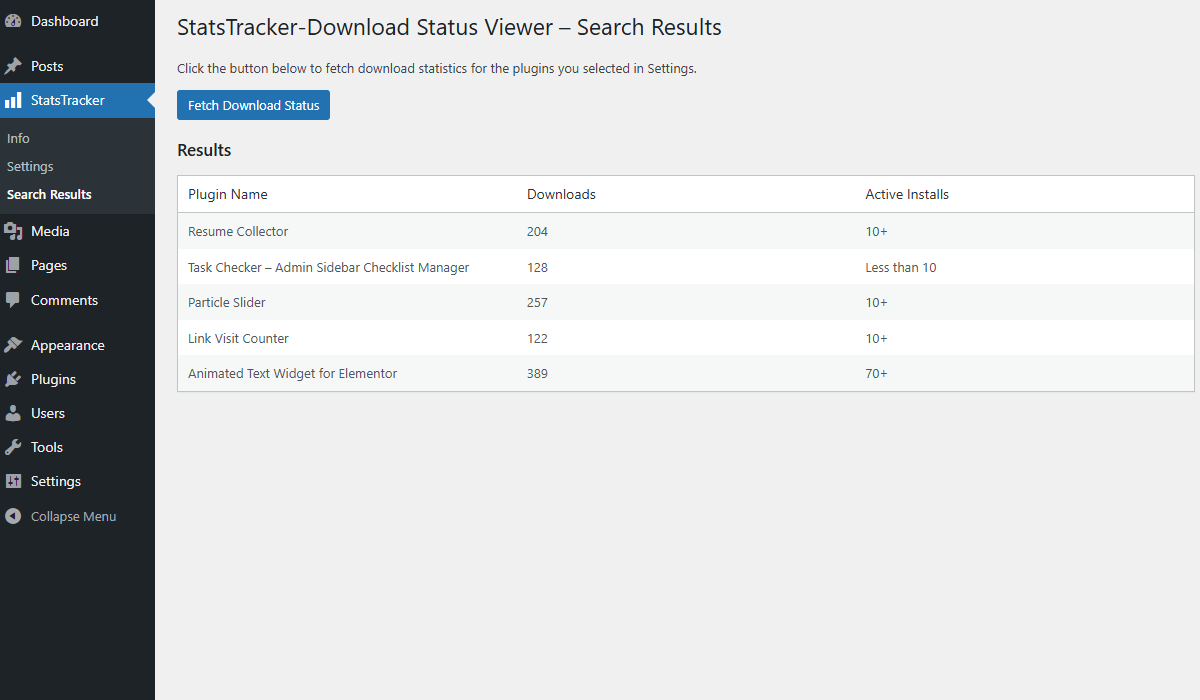
Example of search result’s page output.
Uzstādīšana
- Upload the plugin files to the
/wp-content/plugins/statstracker-download-status-viewerdirectory, or install the plugin through the WordPress Plugins screen. - Activate the plugin through the ‘Plugins’ screen in WordPress.
- Go to StatsTracker from the admin sidebar.
- Click the Fetch Download Status button to retrieve the latest statistics.
- (Optional) Use the provided shortcode
[stdlstusvwr_status_viewer]to display results on the frontend.
BUJ
-
How many plugins can be tracked at once?
-
You can view download statistics for up to 50 selected WordPress.org plugins.
-
When is the data fetched from WordPress.org?
-
The data is fetched only when you click the button, both in the admin area and on the frontend.
-
Does this plugin store download data locally?
-
No. The plugin retrieves live data from WordPress.org when requested.
Atsauksmes
Par šo spraudni nav atsauksmju.
Autori un izstrādātāji
“StatsTracker – Download Status Viewer” ir atvērtā pirmkoda programmatūra. Šo spraudni ir veidojuši šādi cilvēki.
Līdzdalībnieki
Tulkot “StatsTracker – Download Status Viewer” savā valodā.
Vai jūs interesē attīstība?
Pārlūkojiet kodu, apmeklējiet SVN krātuvi vai abonējiet attīstības žurnālu, ko izveidojis RSS.
Izmaiņu žurnāls
1.0
- Initial release.