Pāriet uz saturu
WordPress.org

Latviešu valodā

  • Tēmas
  • Spraudņi
  • Jaunumi
  • Par
  • Iegūstiet WordPress
Iegūstiet WordPress
WordPress.org

Plugin Directory

Webknit Site Toolkit

  • Iesniegt spraudni
  • Mani favorīti
  • Pieslēgties
  • Iesniegt spraudni
  • Mani favorīti
  • Pieslēgties

Webknit Site Toolkit

Autors Webknit Digital
Lejupielādēt
  • Sīkāka informācija
  • Atsauksmes
  • Uzstādīšana
  • Attīstība
Atbalsts

Apraksts

Webknit Site Toolkit lets a site administrator:

  • Recolor the wp-admin sidebar, links, buttons, and form inputs, entered as hex codes or picked visually.
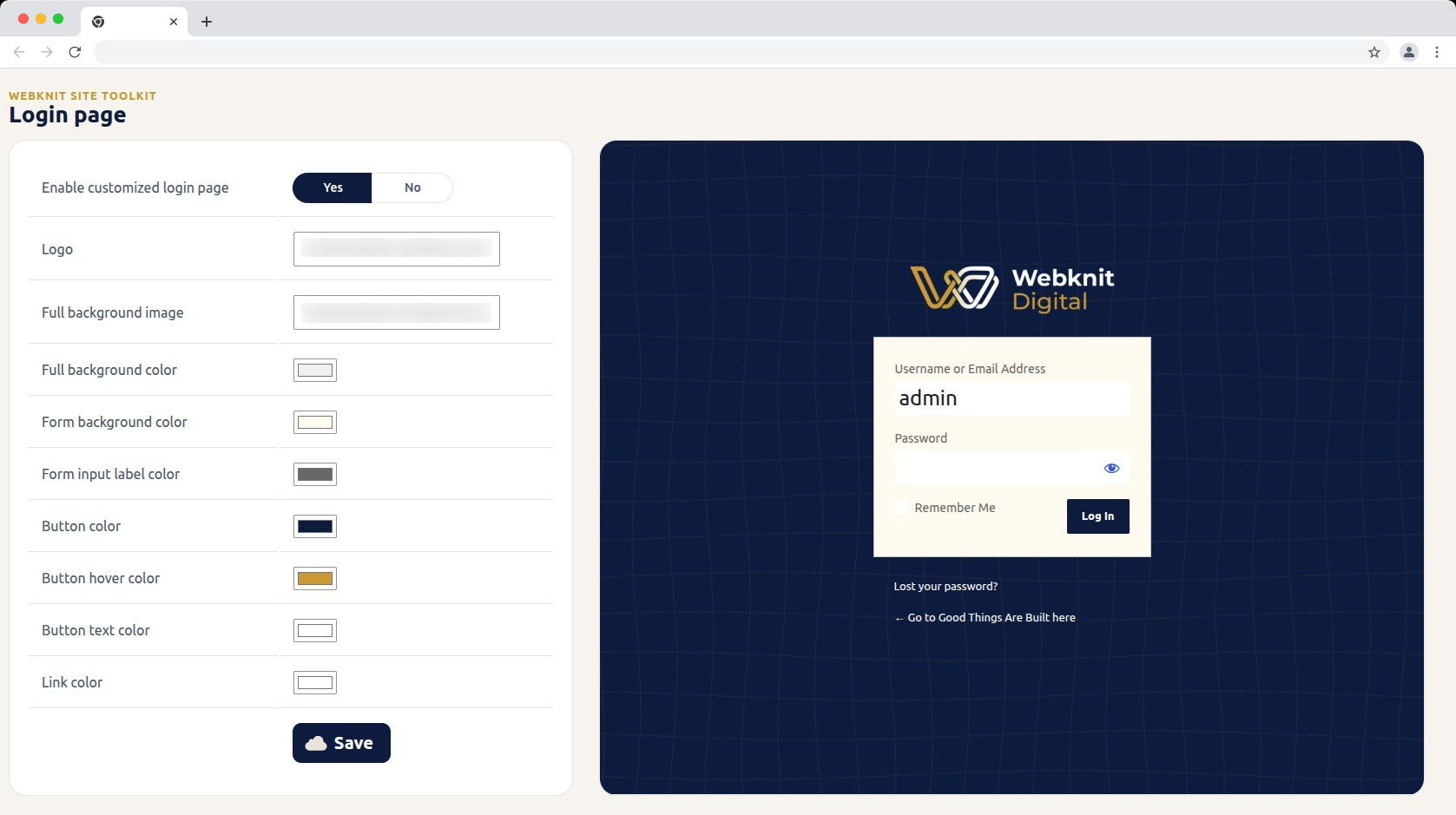
  • Customize the login screen: logo, full-page background image/color, form background/label colors, and button colors/text.
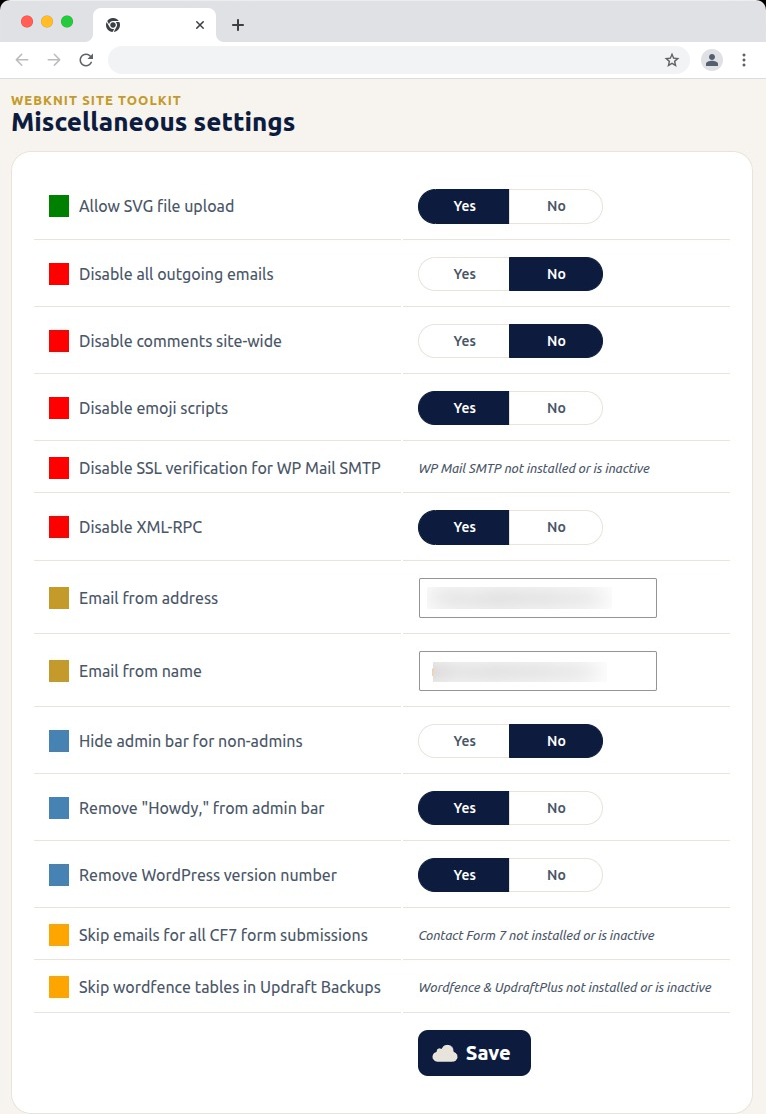
  • Toggle a set of miscellaneous settings: allow SVG uploads, disable SSL verification for WP Mail SMTP, disable outgoing emails, skip Wordfence tables during UpdraftPlus backups, skip Contact Form 7 submission emails, disable XML-RPC, remove the WordPress version number, disable emojis, hide the admin bar for non-admins, disable comments sitewide, remove “Howdy,” from the admin bar, and override the outgoing mail “from” name/address.

Ekrānuzņēmumi
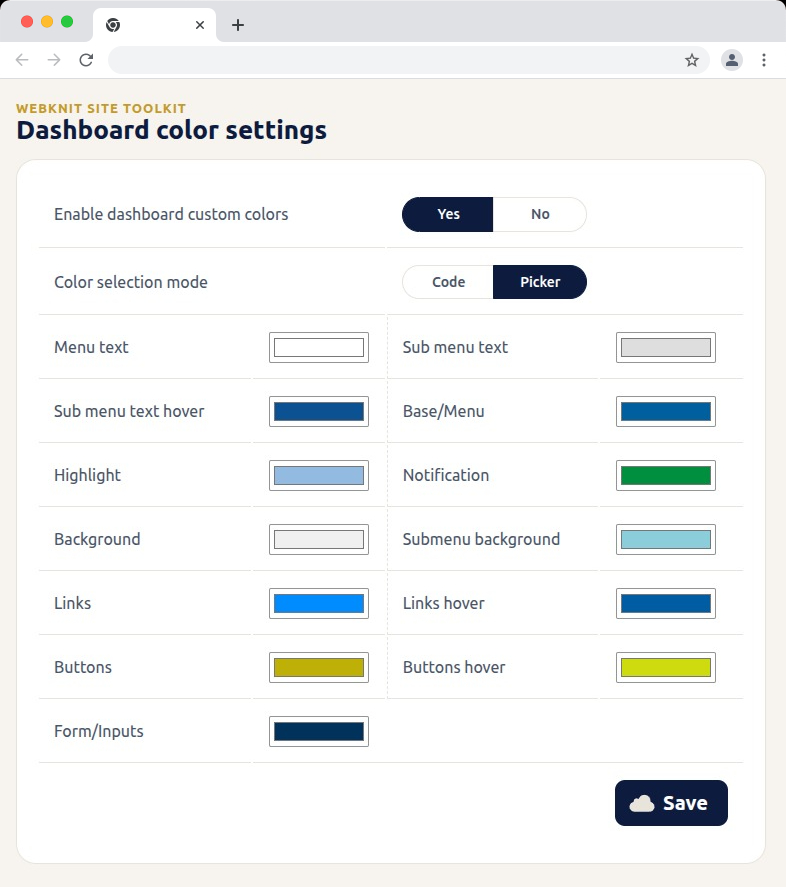
Dashboard color settings — recolor the wp-admin sidebar, links, buttons, and form inputs with hex codes or a visual picker.
Login page — customize the logo, background, form colors, and button styling, with a live preview alongside the settings.
Miscellaneous settings — toggle SVG uploads, outgoing email, comments, XML-RPC, and more; toggles for a plugin that isn't installed or active show a status message instead of a Yes/No choice.
Miscellaneous settings — toggle SVG uploads, outgoing email, comments, XML-RPC, and more; toggles for a plugin that isn’t installed or active show a status message instead of a Yes/No choice.

Uzstādīšana

  1. Upload the plugin files to /wp-content/plugins/webknit-site-toolkit, or install through the WordPress plugins screen directly.
  2. Activate the plugin through the “Plugins” screen in WordPress.
  3. Use the “Site Toolkit” menu in wp-admin to configure dashboard colors, the login page, and miscellaneous settings.

BUJ

Why does one of the Misc. settings toggles show a message instead of Yes/No?

That setting acts on another plugin (WP Mail SMTP, Contact Form 7, or Wordfence + UpdraftPlus) that isn’t currently installed or active, so the toggle would have no effect. The message replaces the toggle until that plugin is active; your previously saved choice is kept and reappears once it is.

I don’t see the “Site Toolkit” menu in wp-admin.

Access requires the manage_options capability, which by default only Administrators have.

I changed a color or setting and saved, but the site still looks the same.

Generated CSS is served with a cache-busting version, but browsers can still hold an old copy. Hard-refresh the page (Ctrl+Shift+R / Cmd+Shift+R) and confirm the save actually completed.

Where are the generated CSS files stored?

In wp-content/uploads/webknit-site-toolkit/. That directory must be writable by the web server, or dashboard/login color changes won’t apply.

Atsauksmes

Par šo spraudni nav atsauksmju.

Autori un izstrādātāji

“Webknit Site Toolkit” ir atvērtā pirmkoda programmatūra. Šo spraudni ir veidojuši šādi cilvēki.

Līdzdalībnieki
  • Webknit Digital

Tulkot “Webknit Site Toolkit&#8221 savā valodā.

Vai jūs interesē attīstība?

Pārlūkojiet kodu, apmeklējiet SVN krātuvi vai abonējiet attīstības žurnālu, ko izveidojis RSS.

Izmaiņu žurnāls

1.0.1

  • Fix: outgoing email failed with an “Invalid address” error when the “Email from address” or “Email from name” field was left empty.
  • Fix: Contact Form 7’s per-form skip_mail setting was ignored while “Skip emails for all CF7 form submissions” was off.

1.0.0

  • Initial release.

Meta

  • Versija 1.0.1
  • Pēdējo reizi atjaunots: pirms 3 nedēļas
  • Aktīvās instalācijas: Mazāk par 10
  • WordPress versija 6.0 vai jaunāka
  • Pārbaudīts līdz: 7.1.4
  • PHP versija 7.4 vai jaunāka
  • Valoda
    English (US)
  • Birkas:
    admincolorsdashboardloginsettings
  • Papildu skats

Vērtējumi

Vēl nav iesniegta neviena atsauksme.

Your review

Skatīt visasatsauksmes

Līdzdalībnieki

  • Webknit Digital

Atbalsts

Jums ir kaut kas ko teikt? Vajadzīga palīdzība?

Skatīt atbalsta forumu

  • Par
  • Jaunumi
  • Uzturētājs
  • Privātums
  • Vitrīna
  • Tēmas
  • Spraudņi
  • Modeļi
  • Uzziniet
  • Atbalsts
  • Izstrādātāji
  • WordPress.TV
  • Iesaistieties
  • Pasākumi
  • Ziedot
  • Swag ↗
  • WordPress.com
  • Matt
  • bbPress
  • BuddyPress
WordPress.org

Latviešu valodā

The WordPress® trademark is the intellectual property of the WordPress Foundation.

  • Apmeklējiet mūsu X (agrāk Twitter) kontu
  • Apmeklējiet mūsu Bluesky kontu
  • Apmeklējiet mūsu Mastodon kontu
  • Apmeklējiet mūsu Threads kontu
  • Apmeklējiet mūsu Facebook lapu
  • Apmeklējiet mūsu Instagram kontu
  • Apmeklējiet mūsu LinkedIn kontu
  • Apmeklējiet mūsu TikTok kontu
  • Apmeklējiet mūsu YouTube kanālu
  • Apmeklējiet mūsu Tumblr kontu
Kods ir dzeja.