Pāriet uz saturu
WordPress.org

Latviešu valodā

  • Tēmas
  • Spraudņi
  • Jaunumi
  • Par
  • Iegūstiet WordPress
Iegūstiet WordPress
WordPress.org

Plugin Directory

WP ShareX

  • Iesniegt spraudni
  • Mani favorīti
  • Pieslēgties
  • Iesniegt spraudni
  • Mani favorīti
  • Pieslēgties

Šī spraudnis nav atjaunināts vairāk kā divus gadus. Varbūt, tas vairs netiek uzturēts, nesaņemt atbalstu un tam var būt saderības problēmas ar jaunākām WordPress versijām.

WP ShareX

Autors joomdev
Lejupielādēt
  • Sīkāka informācija
  • Atsauksmes
  • Uzstādīšana
  • Attīstība
Atbalsts

Apraksts

WP ShareX is an advanced WordPress Social Share plugin enables you to add social share buttons on Posts and pages. You can assign buttons on Top of the Content, Bottom of the Content, Sidebar and on media.

Features of WP Social Share by JoomDev
1. 24 Social Network
2. You have the option to select either Icons or Icons with Text
3. 3 Button Shapes
4. 4 Button Animations
5. URL Shortening Option with Bitly and Goo.gl
6. Embed Twitter Handle and desired tags with Tweet
7. 4 Button display Location e.i. Top of the Content, Bottom of the content, Media, and Sidebar
8. Hide On Mobile Ability
9. Default Share Count Option. (You can play with your user’s mind)
10. Encourage your Audience to share your content with Share Incentive Feature

Ekrānuzņēmumi
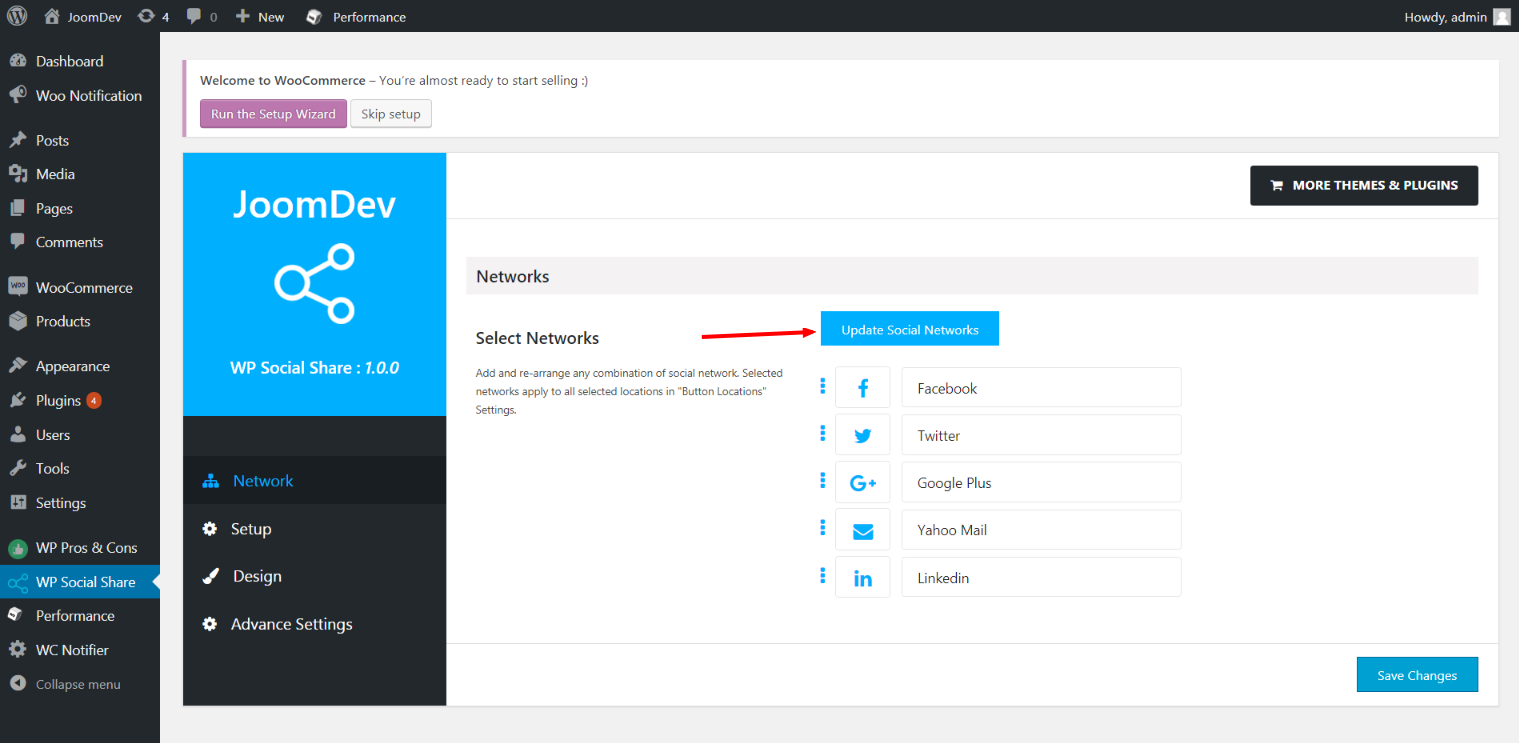
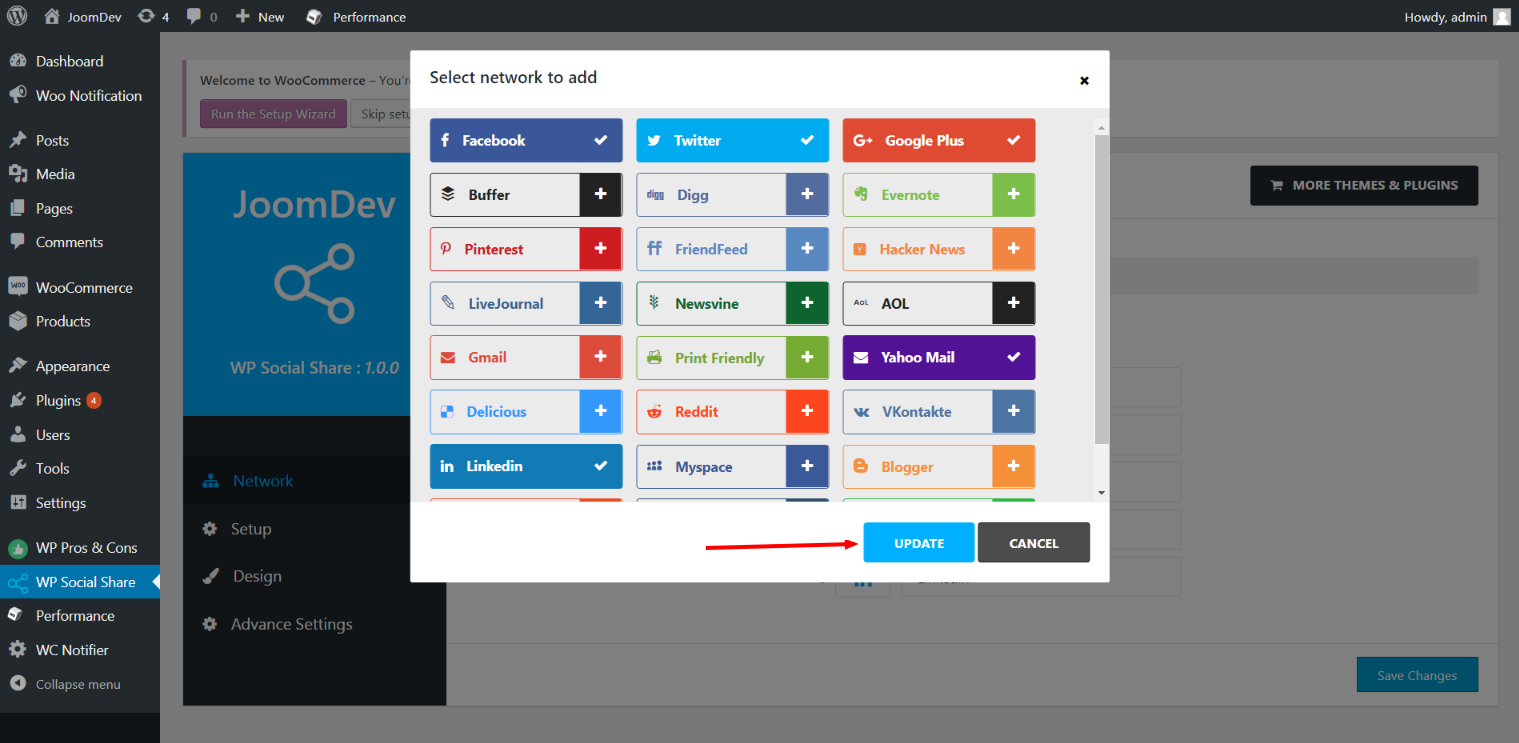
Click here to select networks
Update networks after selecting them.
Setup plugin and api settings.
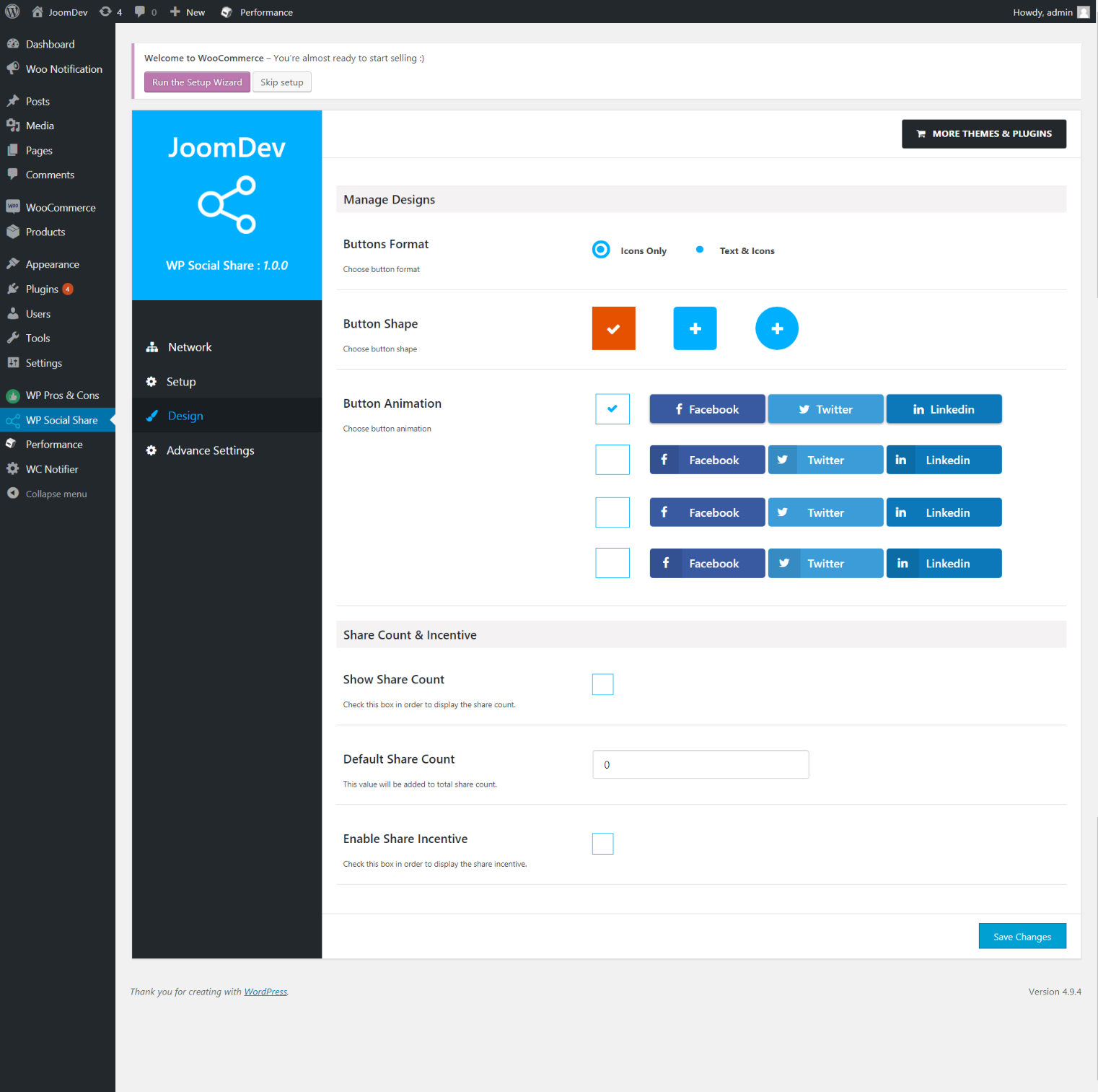
Select any design to display the buttons.
For mobile
For mobile

Uzstādīšana

Way 1: 1. Upload joomdev-wp-social-share.zip to the /wp-content/plugins/ directory 2. Extract the zip file. 3. Activate the plugin from wordpress plugins page. And you have done.

Way 2: 1. Go to plugins page in admin. 2. Click on Add New button. 3. Search for “WP ShareX”. 4. Click install on WP Social Share. 5. Activate the plugin.

BUJ

Installation Instructions

Way 1:
1. Upload joomdev-wp-social-share.zip to the /wp-content/plugins/ directory
2. Extract the zip file.
3. Activate the plugin from wordpress plugins page. And you have done.

Way 2:
1. Go to plugins page in admin.
2. Click on Add New button.
3. Search for “WP ShareX”.
4. Click install on WP Social Share.
5. Activate the plugin.

How do I use this plugin?

See description.

Atsauksmes

Excellent!

Arnab Mohapatra 16 marts, 2018 1 atbilde
Incredible plugin. It allows to add any sharing button on the page simply and fast!
Lasīt 1 atsauksmes

Autori un izstrādātāji

“WP ShareX” ir atvērtā pirmkoda programmatūra. Šo spraudni ir veidojuši šādi cilvēki.

Līdzdalībnieki
  • joomdev

Tulkot “WP ShareX&#8221 savā valodā.

Vai jūs interesē attīstība?

Pārlūkojiet kodu, apmeklējiet SVN krātuvi vai abonējiet attīstības žurnālu, ko izveidojis RSS.

Izmaiņu žurnāls

1.0.0

  • New Plugin initialized.

Meta

  • Versija 1.0.0
  • Pēdējo reizi atjaunots: pirms 9 gadiem
  • Aktīvās instalācijas: 10+
  • WordPress versija 3.0 vai jaunāka
  • Pārbaudīts līdz: 4.9.34
  • Valoda
    English (US)
  • Birkas:
    sharesocialsocial share
  • Papildu skats

Vērtējumi

5 no 5 zvaigznēm.
  • 1 5-star review 5 zvaigznes 1
  • 0 4-star reviews 4 zvaigznes 0
  • 0 3-star reviews 3 zvaigznes 0
  • 0 2-star reviews 2 zvaigznes 0
  • 0 1-star reviews 1 zvaigzne 0

Your review

Skatīt visasatsauksmes

Līdzdalībnieki

  • joomdev

Atbalsts

Jums ir kaut kas ko teikt? Vajadzīga palīdzība?

Skatīt atbalsta forumu

Ziedojiet

Vai vēlaties atbalstīt šī spraudņa pilnveidošanu?

Ziedojiet šim spraudnim

  • Par
  • Jaunumi
  • Uzturētājs
  • Privātums
  • Vitrīna
  • Tēmas
  • Spraudņi
  • Modeļi
  • Uzziniet
  • Atbalsts
  • Izstrādātāji
  • WordPress.TV
  • Iesaistieties
  • Pasākumi
  • Ziedot
  • Swag ↗
  • WordPress.com
  • Matt
  • bbPress
  • BuddyPress
WordPress.org

Latviešu valodā

The WordPress® trademark is the intellectual property of the WordPress Foundation.

  • Apmeklējiet mūsu X (agrāk Twitter) kontu
  • Apmeklējiet mūsu Bluesky kontu
  • Apmeklējiet mūsu Mastodon kontu
  • Apmeklējiet mūsu Threads kontu
  • Apmeklējiet mūsu Facebook lapu
  • Apmeklējiet mūsu Instagram kontu
  • Apmeklējiet mūsu LinkedIn kontu
  • Apmeklējiet mūsu TikTok kontu
  • Apmeklējiet mūsu YouTube kanālu
  • Apmeklējiet mūsu Tumblr kontu
Kods ir dzeja.