
Apraksts
Sends e-mail notifications to a configurable list of addresses when Pages are published, scheduled, or modified. People on the notification list will know what page changed, and in what way it changed (e.g. updated, published, scheduled, trashed, etc).
Ekrānuzņēmumi
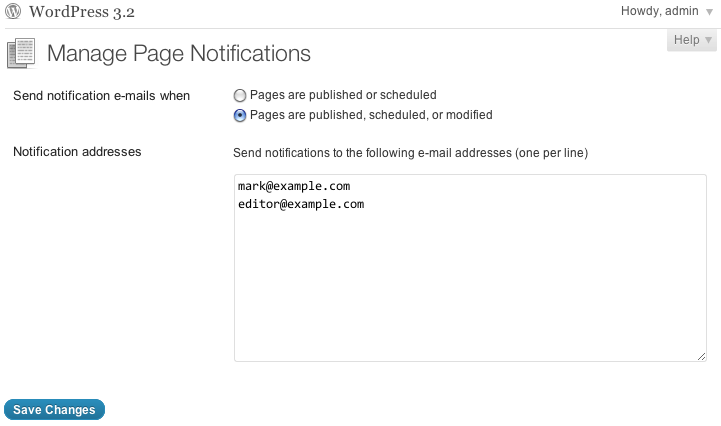
Uzstādīšana
Upload the
monitor-pagesfolder to your/wp-content/plugins/directoryActivate the “Monitor Pages” plugin in your WordPress administration interface
Go to Pages → Manage Notifications as an Administrator to get started
BUJ
- When are people notified?
-
Depends on your setting. With the “published or scheduled” setting, they’ll be notified when a Page transitions to published or scheduled from a different status. With the “published, scheduled, or modified” setting, they’ll be notified when a Page transitions to or from published or scheduled status, including published-to-published statuses (i.e. updates to published posts).
Atsauksmes
Par šo spraudni nav atsauksmju.
Autori un izstrādātāji
“Monitor Pages” ir atvērtā pirmkoda programmatūra. Šo spraudni ir veidojuši šādi cilvēki.
Līdzdalībnieki
Tulkot “Monitor Pages” savā valodā.
Vai jūs interesē attīstība?
Pārlūkojiet kodu, apmeklējiet SVN krātuvi vai abonējiet attīstības žurnālu, ko izveidojis RSS.
Izmaiņu žurnāls
0.4.2
- Add a filter, so people can further restrict notifications
0.4.1
- Better encapsulate the compat code
0.4
- Fixed a bug where the title wasn’t showing up in the message body
- Added a page link to the message body
0.3
submit_button()andget_submit_button()back compat, for WordPress 3.0.x
0.2
esc_textarea()back compat, for WordPress 3.0.x
0.1
- Initial version